
ServiceMonster price and terms
Terms
- Free to start
- PartlyNo free plan (limited free use)14 days with access to all features, no credit card required, cancellable at any time before the end of the trial
- Sign up without sales
- YesYes
The terms in full
no standing free plan exists afterwards.
What needs a higher plan
- Grow
- Cost for 5 users a month, Cost for 10 users a month, Leads and follow-ups, Marketing campaigns, Job costing and reports
- Grow, Premier
- Adding a user
- Premier
- Parts and inventory
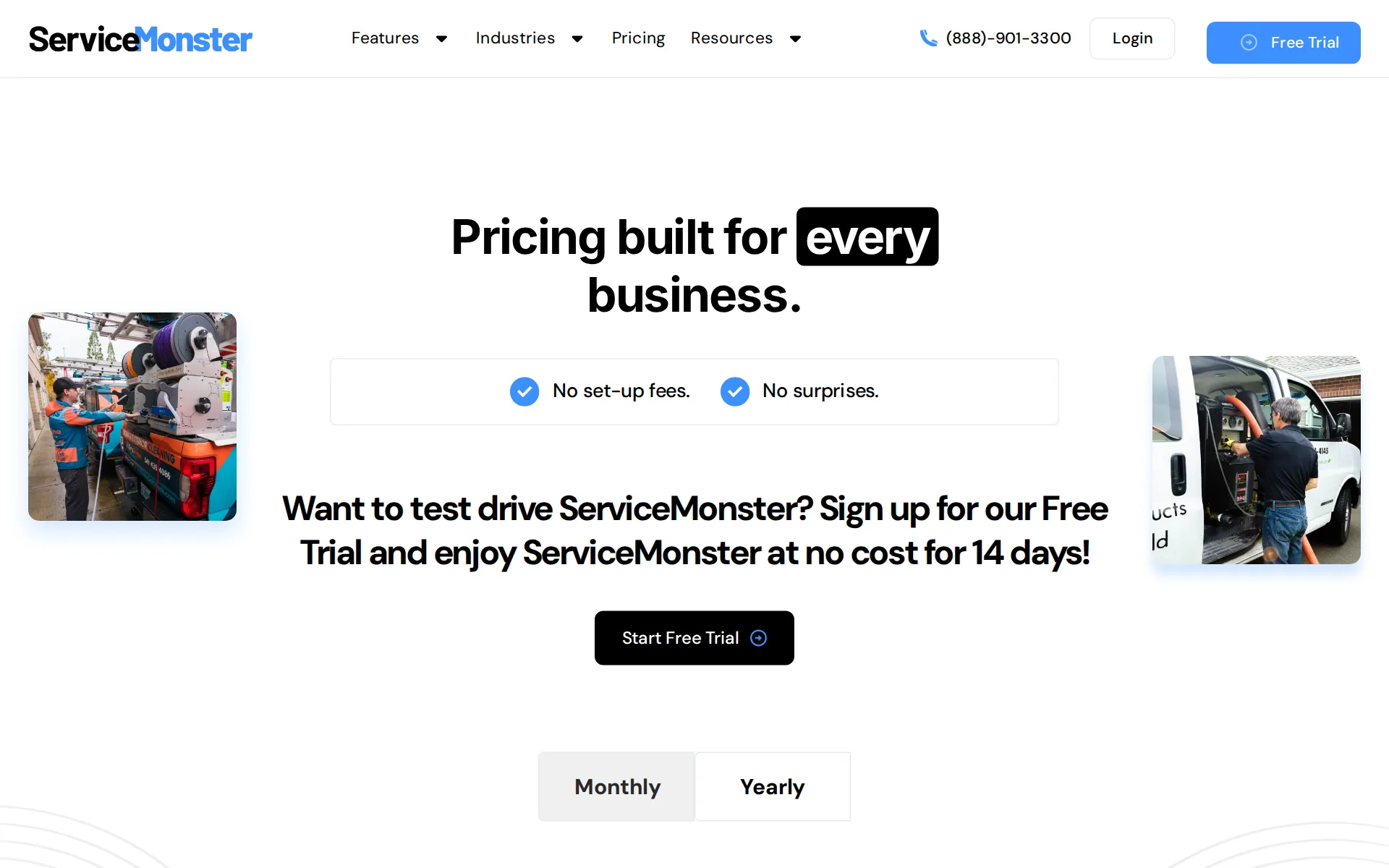
Pricing page, captured
servicemonster.com/pricing, checked
What we checked on ServiceMonster
Cost for 5 users a month
$199.99 a month on Grow for 5 users. Counted as one office user and the rest technicians in the field. Basic might cost less, but no overage price is published, so it could not be priced past its allowance.
Grow $199.99/month Billed monthly 5 User Licenses
Cost for 10 users a month
$274.99 a month on Grow for 10 users. Counted as one office user and the rest technicians in the field. Basic might cost less, but no overage price is published, so it could not be priced past its allowance.
On the page: Plan cards, Grow card, Monthly tab
Cost for one person a month
The Basic plan at $99.99 a month billed monthly includes one user license, or $79.99 a month on yearly billing; the pricing FAQ says every plan needs an annual commitment.
Basic $99.99/month Billed monthly 1 User License
servicemonster.com/pricingChecked
Promotion and regular price
none - the figure shown first is the regular month-to-month rate, because the billing control opens on Monthly; a separate second-month-free promotion is advertised on the trial page and applies to every plan.
Pay for your first month and your second month is on us!
servicemonster.com/trialChecked
Quote only
All three self-serve plans carry published prices, but franchise and corporate deployments with CallCenter, white-label branding and read-only database access are arranged through a sales consultation with no rate published.
We can tailor a custom software solution that fits your franchise's needs along with offering dedicated support.
What the price is based on
Each plan bundles a fixed number of user licences - one, five or ten - and extra users are then charged per head, so the price is a plan with a user allowance rather than pure per-seat billing.
On the page: Plan cards, Grow card, Monthly tab
servicemonster.com/pricingChecked
Adding a user
Extra users cost $15 a month each on Grow and $25 a month each on Premier; Basic lists one user license and no price for adding more, so growing past one user means moving up a plan.
Additional user is $15/month per user.
servicemonster.com/pricingChecked
Setup or onboarding fee
The vendor denies setup fees twice in its own words, once as a headline promise on the pricing page and once as a direct answer in the trial page's question list.
Are there any setup fees? No, there are no setup fees.
servicemonster.com/trialChecked
Card processing rate
ServiceMonster Pay publishes card rates of 2.9% plus $0.30, Amex at 3.5% plus $0.30, and bank transfer at 1% capped at $15; the page does not say whether its own processing is mandatory.
Visa/Mastercard: 2.9% and $0.30 per transaction Debit Cards: 2.9% and $0.30 per transaction Amex: 3.5% and $0.30 per transaction ACH: 1% up to $15.00
servicemonster.com/payChecked
HVAC
Dedicated industry pages exist for HVAC, plumbing, electrical, lawn care, maid services, carpet, window, pressure washing and softwash, but pest control, pool service and handyman work get no page of their own in the vendor's published…
HVAC Service Software & App Manage your HVAC business from anywhere with one simple software.
Plumbing
Dedicated industry pages exist for HVAC, plumbing, electrical, lawn care, maid services, carpet, window, pressure washing and softwash, but pest control, pool service and handyman work get no page of their own in the vendor's published…
On the page: Page hero heading and subheading
Electrical
Dedicated industry pages exist for HVAC, plumbing, electrical, lawn care, maid services, carpet, window, pressure washing and softwash, but pest control, pool service and handyman work get no page of their own in the vendor's published…
On the page: Page hero heading and subheading
Lawn care and landscaping
Dedicated industry pages exist for HVAC, plumbing, electrical, lawn care, maid services, carpet, window, pressure washing and softwash, but pest control, pool service and handyman work get no page of their own in the vendor's published…
On the page: Page hero heading and subheading
Pest control
Dedicated industry pages exist for HVAC, plumbing, electrical, lawn care, maid services, carpet, window, pressure washing and softwash, but pest control, pool service and handyman work get no page of their own in the vendor's published…
On the page: Page hero heading and subheading
Pool service
Dedicated industry pages exist for HVAC, plumbing, electrical, lawn care, maid services, carpet, window, pressure washing and softwash, but pest control, pool service and handyman work get no page of their own in the vendor's published…
On the page: Page hero heading and subheading
Handyman
Dedicated industry pages exist for HVAC, plumbing, electrical, lawn care, maid services, carpet, window, pressure washing and softwash, but pest control, pool service and handyman work get no page of their own in the vendor's published…
On the page: Page hero heading and subheading
Features for one trade
The price list carries flat-rate service and product pricing with custom units such as square footage or consumables by the gallon, plus packages and locked items; chemical logs, pool readings and HVAC equipment histories are not described anywhere.
Use custom units to fine-tune your pricing. Bill by square footage, or charge for consumables by the gallon. The price list is yours to customize.
Schedule and calendar
One calendar holds every route, jobs drag between routes and time slots to rebalance the day, and stacking conflicts surface clashes; a waitlist sidebar parks work that has no slot yet.
Schedule work for multiple routes in one place. Drag jobs between routes to balance your workload.
Technician app
The iOS and Android app shows technicians their schedule, lets them check into jobs, look up and edit account details and work history, and add notes and photos from the site.
The mobile app lets technicians view their schedule, send updates to customers, and check into jobs.
Route planning
Routing is assisted rather than automatic: colour coding and a compass way-finding system help the office assign jobs to the nearest crew, and multiple stops are then pushed to Google Maps for directions, but no automatic stop-order optimiser is described.
Optimize your routes with location-based color coding. See where locations are relative to your dispatch site and intuitively assign jobs to the…
Where the trucks are
The office can see technicians' GPS locations alongside their check in and check out times; GPS appears on the Manage Teams feature page with no separate charge or plan gate stated on the comparison table.
See GPS locations and technicians' check in/check out times to keep teams accountable.
Texts to customers
Automated email and text reminders go out before the visit and arrival windows give a time range rather than a fixed time; technicians also send updates from the app, though no automatic en-route 'on my way' trigger is documented.
Create automated client reminders too target the right clients and wow customers with responsive messaging.
Maintenance plans and recurring jobs
Recurring work is generated automatically from an existing order or from scratch, and the invoicing page covers contract management and automated billing; the vendor does not use the words maintenance plan or membership.
Schedule large jobs across multiple days and automatically create multiple jobs for recurring work.
Checklists, photos and signatures
On site technicians capture notes, before-and-after photos that attach themselves to the job, and the customer's signature with payment; a structured checklist or custom form builder is not described.
On the job, employees can take notes and photos to document job progress. When the job is done, payments and signatures can be securely collected…
Quotes and estimates
Estimates are built on site from price lists and packages, sent electronically, and the customer approves or declines online with an email notification back to the office when the status changes.
Simply send estimates electronically and let your clients approve or decline work right away. Quick email notifications update you on the status so…
Price book and options
A central price list holds services and products with codes, favourites, locked items and batch percentage updates, and bundles are sold as pre-built packages rather than as a good-better-best tier picker.
Create a package to bundle products and services and add all of them to an order at the same time.
Invoices
An order turns into a branded invoice that can be paid on the job or sent later, and the invoice report shows what is awaiting payment with automated past-due notices by text or email.
Easily see which orders await payment and easily send automated past-due notices by text or email.
Card and bank payments
Customers pay by Visa, Mastercard, Amex, Discover, debit card or bank transfer, in person on the technician's phone, over the phone, or through a secure payment link sent by email or text, with cards stored for repeat billing.
Visa, Mastercard, American Express, Discover, debit cards, and ACH (e-Check) are all accepted through ServiceMonster Payments. Take payments on-site…
Fast payouts
The vendor's stated deposit speed is two business days for both card and bank transfer settlement, and it sells no faster same-day or next-day payout option, so there is also no expedited payout fee to pay.
No more check holds or waiting for deposits to be released. Access to settled funds happens within two business days.
servicemonster.com/payChecked
Parts and inventory
Inventory Control is listed as a feature of the top Premier plan only, and is explicitly crossed out on both Basic and Grow in the comparison table; nothing states whether stock can be split between trucks and the shop.
On the page: Compare plans table, Inventory Control row - crossed out on Basic and Grow, ticked on Premier
servicemonster.com/pricingChecked
Online booking
Web forms on the business's own site let customers book a service or request an estimate at any hour with instant notification back to the office, and booking is bi-directional against real calendar availability.
Enable self-service scheduling and let customers see your availability with bi-directional online booking.
Review requests
Review collection is not built in; it comes from the NiceJob and Broadly reputation partners, and the vendor's own NiceJob page says the customer must separately hold a NiceJob trial or paid plan for the sync to work.
Be sure you have both an active ServiceMonster account and either be on a trial for NiceJob, or on our Grow plan.
Timesheets
Technicians check in and out of jobs from the app, hours save automatically and the logs do not expire; the vendor never names a payroll package the hours can be exported to.
Technician hours are saved automatically. Time logs do not expire and are easy to reference later.
Technician commissions
Commission rates are set per employee and calculated automatically, and the price list can switch commission on at either base or upsell level per service, with performance reports on top.
Set up commission rates customized for employees and calculate them automatically. Track performance in real time and generate reports to help…
Leads and follow-ups
Lead tracking with a Kanban board, source, stage and owner is real but gated: the Leads row is crossed out on the entry Basic plan and ticked only from Grow upward, and Opportunities needs Premier.
See at a glance which leads have been won or lost. Visual tools like a Kanban board help you easily manage your sales pipeline.
servicemonster.comChecked
Marketing campaigns
Automated email, call-list and direct mail campaigns are crossed out on Basic and start at Grow, with drip campaigns held back to Premier; FillMySchedule direct mail is an in-house print service whose per-card price is published nowhere.
Work smarter not harder by creating automated marketing campaigns for email, call lists, mail/label lists, and export lists scheduled to run whenever…
Several locations
The franchise offering runs many accounts from one place through ServiceMonster CallCenter with global permissions and user groups, though it is arranged through a sales consultation rather than bought from the pricing page.
ServiceMonster CallCenter allows corporate clients and call center agents to manage many accounts in one place. With CallCenter you can seamlessly…
Job costing and reports
Reporting and dashboards are crossed out on Basic and begin at Grow; they cover revenue by route or service group and technician performance, but no page describes job profit net of labour and parts cost.
Easily view leads, sales, revenue, and tech performance with easy to digest charts and graphs.
QuickBooks Online
QuickBooks Online and QuickBooks Desktop both sync customers, invoices, payments and sales tax items, on every plan - the comparison table gates no accounting row.
For ServiceMonster users, our integration for QuickBooks Desktop and QuickBooks Online makes accounting and bookkeeping a breeze.
QuickBooks Desktop
QuickBooks Online and QuickBooks Desktop both sync customers, invoices, payments and sales tax items, on every plan - the comparison table gates no accounting row.
On the page: Description tab, Powerful Bookkeeping Automation section
Xero
No Xero integration is named anywhere on the site.
On the page: Description tab, Powerful Bookkeeping Automation section
Canada
Canada, the UK and Australia are never mentioned.
All payments hereunder shall be made in US dollars and are due within thirty days of receipt of the applicable invoice.
Australia
Canada, the UK and Australia are never mentioned.
On the page: Section 6, Fees and Payment, clause Fees
Free trial or free plan
You can run your own jobs through every feature for 14 days without a card, but there is no standing free plan: once the trial ends a paid subscription level must be chosen to keep working.
You can give ServiceMonster a try and get access to all features free for 14 days. There's no credit card required and you can cancel anytime.
Sign up without a sales call
A trial starts from the website with no card and no call, and at the end of it the customer picks a subscription level and a payment method themselves; a demo is offered alongside rather than required.
Once your trial is over, you can choose a subscription level and choose a payment method.
servicemonster.com/trialChecked
Help getting set up
Free Training and Free Phone Support are ticked on all three plans, there is a dedicated onboarding site, and the QuickBooks importer brings over clients, price lists, invoice and payment history and employees.
Our quick and easy QuickBooks import allows you to bring all your QuickBooks data such as client list, price list, products & services, invoice &…
Contract and cancelling
A monthly software subscription can be cancelled at any time without penalty, but annual plans are billed for the whole year up front and the separate ServiceMonster Payments product requires a twelve-month commitment.
No, there are no commitments or contracts. If you sign up for ServiceMonster, you can cancel your monthly subscription at any time and without…
servicemonster.com/trialChecked
Support
Free phone support is included on every plan from an in-house US team reachable by phone or email, but the published hours are Monday to Friday 6am to 5pm Pacific, so a Saturday morning breakdown has no live channel.
Hours: Monday-Friday: 6am to 5pm PT
servicemonster.com/contactChecked
Getting your data out
Reports export business data directly, invoices, payments, customers and products push out to QuickBooks, and the terms let a customer request return of its data within thirty days of termination.
Customer may request return of Customer Data within thirty days of the date of expiration or termination.
ServiceMonster alternatives
All 9 alternatives6 more alternatives
6 of the 9 publish a price.
- Service FusionOn quoteField service software with unlimited users on every plan and QuickBooks Online or Desktop sync from the base plan.
- ServiceTitanOn quoteAll-in-one field service platform for residential and commercial trade contractors, priced per technician on quote.
- ServiceCoreOn quoteDispatch, routing, unit inventory and batch billing built for portable toilet, septic, grease and dumpster haulers.
- fielddFrom $199 a monthAll-in-one booking, scheduling, payments and marketing software for mobile and shop service businesses.


Sources and changes
Last changed
Sources on servicemonster.com35
- /pricing
- /features/schedule
- /
- /features/manage-teams
- /features/price-list
- /trial
- /features/manage-teams
- /features/payments
- /features/schedule
- /features/invoicing
- /features/invoicing
- /features/price-list
- /features/routing-dispatch
- /pay
- /terms-of-service
- /contact
- /features/before-and-after
- /features/customer-coms
- /features/customer-coms
- /features/estimates
- /features/estimates
- /features/marketing-campaigns
- /features/messaging-and-texting
- /features/monthly-planner
- /features/payments
- /features/reporting
- /features/reporting
- /features/routing-dispatch
- /features/upselling
- /franchises
- /industries/hvac
- /integrations/invoice-page
- /integrations/nicejob
- /integrations/order-approval
- /integrations/quickbooks
What changed on this page1
- Field features
Similar in Field service software
See all in Field service software
- SimproTrade job management with project costing, inventory and asset maintenance for commercial contractors, sold on quote.
- SingleOpsTree care business management software from Granum: proposals, scheduling, crew work orders, invoicing and payments.
- SkimmerPool-service software with water chemistry tools and per-serviced-location pricing.
- SuccesswareTrade business software with its own general ledger and payables built in, not a QuickBooks sync.


From our research
- Jobber vs Housecall Pro: what a 5- and 10-person crew paysJobber costs $199 a month for 5 users and $299 for 10. Housecall Pro is $299 and $799 on Essentials. Crew prices and the features that differ, Nov 2026.
- What field service software costs and where it jumpsLawn Buddy and ServiceM8 have free plans, several paid plans are cheap to start, and the price jumps with fieldd.
- What Is the Best Timesheet System for Small Businesses?Connecteam is free for small crews, Workyard prices per seat with location-checked timesheets, and Swept fits cleaning companies billed per site.
Is ServiceMonster yours?
It's free and marks the page as verified. You confirm it with an email at servicemonster.com. Claim this listing
Report an error if a fact is wrong.