
Skimmer in our research
Skimmer price and terms
Terms
- Free to start
- PartlyNo free plan (limited free use)New Scaling Up users receive one month free for up to 49 locations
- Sign up without sales
- YesYes
The terms in full
use above that allowance is billed after the trial.
For AI agents
- API
- PartlySkimmer for Enterprise
What needs a higher plan
- Scaling Up
- Cost for one person a month, Promotion and regular price, Route planning, Maintenance plans and recurring jobs, Quotes and estimates, Customer financing
- Skimmer for Enterprise
- AI features, Zapier and API
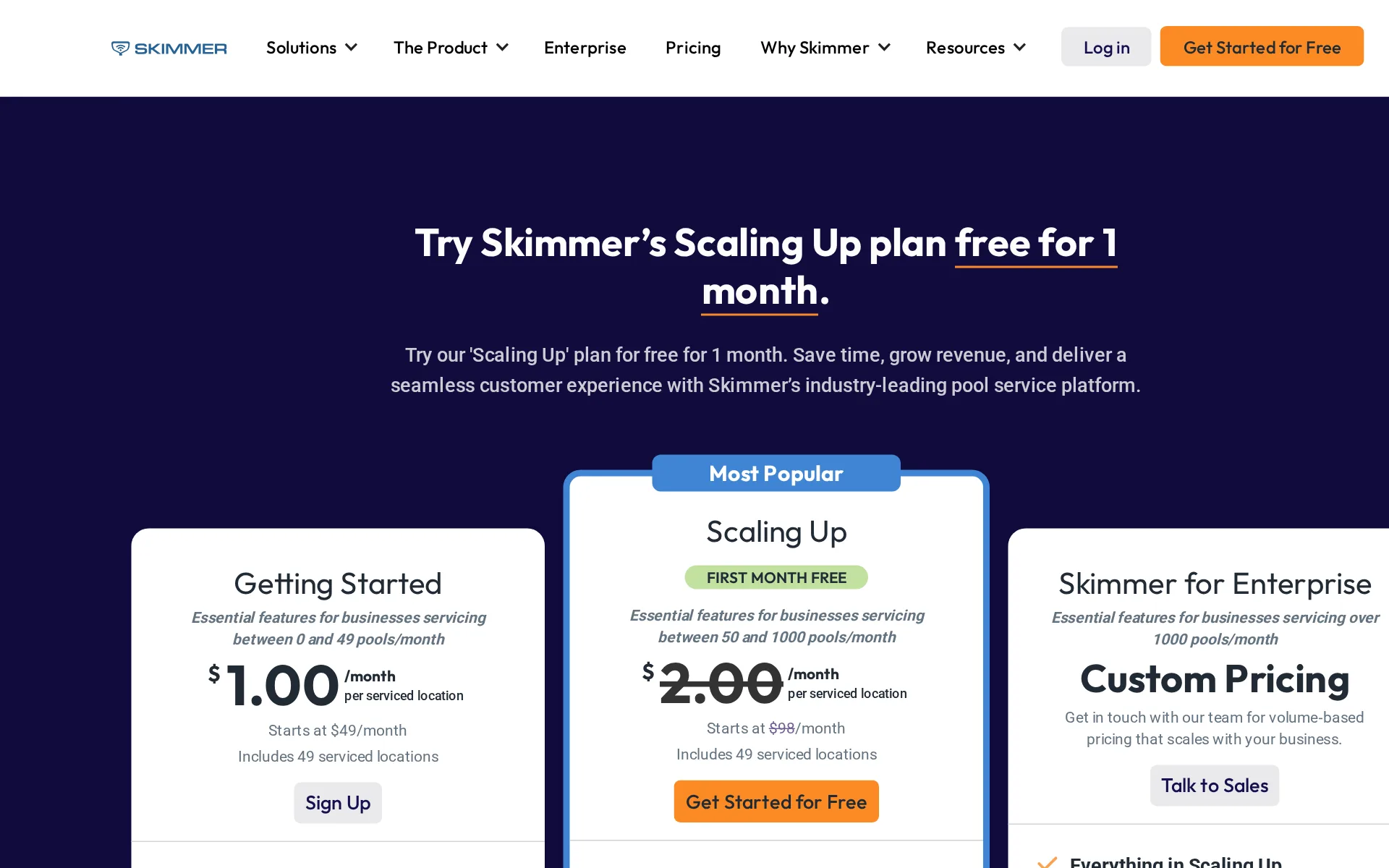
Pricing page, captured
getskimmer.com/pricing, checked
All plans and limits
| Plan | Price | Photos per location | Photos per visit | Serviced locations included |
|---|---|---|---|---|
| Getting Started | From $1 per serviced location a month | 20 photos | 5 photos | 49 serviced locations |
| Scaling Up | From $2 per serviced location a month | 40 photos | 20 photos | 49 serviced locations |
| Skimmer for Enterprise | Price on request | 50 photos | 30 photos | Not stated |
Read from getskimmer.com/pricing.
What we checked on Skimmer
Cost for 5 users a month
From $98 a month on Scaling Up for 5 users. The price of Scaling Up is published only as a starting price, and no plan with a definite price covers this many users: the figure is the least it costs.
Starts at $98/month
Cost for 10 users a month
From $98 a month on Scaling Up for 10 users. The price of Scaling Up is published only as a starting price, and no plan with a definite price covers this many users: the figure is the least it costs.
On the page: Scaling Up plan card, starting-price line
Cost for one person a month
A one-person business needs the Scaling Up plan: its listed $98 monthly base includes quotes, scheduling, invoices, and online payments.
After the free trial, standard pricing applies: $98/month base + $2/month per additional location.
getskimmer.com/pricingChecked
Promotion and regular price
New Scaling Up users receive one free month for up to 49 locations, then the regular $98 monthly base and location charge apply.
On the page: Limited-time Scaling Up promotion terms below the plan cards
getskimmer.com/pricingChecked
Quote only
The Enterprise package has custom volume-based pricing and directs prospective buyers to speak with the sales team.
Custom Pricing Get in touch with our team for volume‑based pricing that scales with your business.
getskimmer.com/pricingChecked
What the price is based on
Skimmer charges by serviced location each month rather than by technician, with a $49 starting base for Getting Started.
you will be billed $1 or $2 per month for each serviced location
getskimmer.com/pricingChecked
Adding a user
The public plans include unlimited technicians and administrators, so adding a technician does not add a user charge.
Unlimited Technicians & Admins
getskimmer.com/pricingChecked
Setup or onboarding fee
Skimmer’s published pricing description expressly says there are no setup fees for the service.
See Skimmer pricing for pool service software. No setup fees, no contracts, and a full refund in 30 days if it doesn't change your business.
getskimmer.com/pricingChecked
Card processing rate
Card processing costs 2.9% plus $0.25 per transaction, with an additional fee for keyed or recurring payments.
For credit and debit cards: 2.9% + $0.25 per transaction (additional 0.5% for keyed or recurring transactions)
Pool service
Skimmer identifies its buyer as pool and spa service companies and supplies workflows focused on pool service operations.
Skimmer is perfect for pool and spa service companies of any size who are looking to go digital, optimize routes, get organized, manage their…
Features for one trade
Pool-specific tools include chemical readings, dosing recommendations, LSI calculations, and Bluetooth test-result syncing.
The Skimmer app lets techs enter readings and dosages in just a few taps, plus with the LSI & Dosing Calculator, you get real-time LSI calculations…
Schedule and calendar
The back-office calendar supports viewing, assigning, optimizing, and drag-and-drop scheduling of field work.
Easily view, assign, and optimize work with a calendar, drag-and-drop scheduling, and an interactive map.
Technician app
The mobile app gives technicians customer information, history, equipment details, gate codes, photos, and field issue reporting.
With Skimmer pool service software, your techs always have the most up-to-date information, including gate codes, pet names, equipment, and photos.
Route planning
All plans include route building, but route optimization is listed only on Scaling Up and Enterprise.
On the page: Scaling Up plan card feature list
getskimmer.com/pricingChecked
Texts to customers
Skimmer sends text updates for upcoming stops, completed jobs, and skips; an arrival-specific message is not described.
Keep customers informed automatically — detailed email reports with photo evidence after every visit, plus real-time texts for upcoming stops,…
Maintenance plans and recurring jobs
Scaling Up includes recurring job schedules, but the pages do not expressly describe selling maintenance-plan contracts.
Recurring Work Orders
getskimmer.com/pricingChecked
Checklists, photos and signatures
Technicians use configurable checklists and can capture photos; Skimmer also supports a customer signature on a mobile quote.
Add line items, attach photos, set a deposit, and either send it to the office for a final check or collect the customer's signature on the spot.
Works without signal
Technicians can complete stops, record readings, and take photos without service; the app syncs once online.
Yes. Techs can complete stops, log readings, and take photos even without cell service. Everything syncs automatically when they're back online.
Quotes and estimates
Quotes and estimates are listed on Scaling Up, where approved quotes can be converted into scheduled jobs or invoices.
Quotes & Estimates
getskimmer.com/pricingChecked
Price book and options
There is a product catalogue of parts and chemicals plus per-location service rates, with bulk import of products and nightly cost sync from PoolCorp or Heritage; tiered good-better-best quote options are not described anywhere on the site.
Keep your Product Catalog current with PoolCorp costs, without retyping them.
Invoices
Invoices can be generated from completed field work or manually, and overdue invoices can trigger automatic email reminders.
Invoices can be generated from completed work within the system or manually for items not captured in the system as "completed work."
Card and bank payments
Customers can pay online by credit card or direct bank account, plus Apple Pay and Google Pay through the portal.
They can pay by credit card, ACH, Apple Pay, or Google Pay, or apply for consumer financing through Sunbit for bigger jobs.
Fast payouts
Skimmer states that credit and debit card payouts can arrive in one business day, without pricing a faster option.
With Skimmer, you can receive credit and debit card payouts in just one business day, giving you faster access to your funds.
Customer financing
Consumer financing through Sunbit is included on Scaling Up and Enterprise, not named on Getting Started.
Consumer financing powered by Sunbit
getskimmer.com/pricingChecked
Parts and inventory
The Shopping List records parts and chemicals and lets workers mark whether an item is on the truck.
Mark items as purchased and indicate whether they are on the truck.
Online booking
The customer portal includes a lead form through which new prospects can request service directly.
new prospects can request service directly through a built-in lead form that captures their details automatically.
Customer portal
The self-service portal provides service history, invoices, quotes, payment details, AutoPay, and one-click invoice payments.
Give your customers a direct line to everything they need — service history, invoices, billing statements, quotes, and payment details.
Review requests
The optional Marketing Suite automatically asks customers for Google reviews after service, rather than including it in the base plan.
Automatically ask customers for Google reviews so nobody has to remember to request them.
Timesheets
Time on site is captured automatically when a tech taps into a stop and taps Finish, but the vendor documents that the clock only starts for the next available stop, and no shift clock-in or payroll export to a named payroll product is described.
When a tech taps into the next available service stop, Skimmer starts the clock automatically. It will then stop the clock when the tech taps Finish.…
Technician commissions
The Labor report shows jobs completed by each lead tech and what you paid to have the work done, but it needs Scaling Up or above, lists only the lead tech on multi-tech work orders, and no commission or bonus calculation is described.
Tiers: Scaling Up and above Overview Gives owners and admins a snapshot of jobs completed by your lead techs, and what you're paying to have the work…
Leads and follow-ups
Skimmer keeps no sales pipeline of its own and says plainly that it does not build or change one; pipeline work happens in HubSpot through an integration that needs the Enterprise tier or a paid add-on, after which a deal reaching your chosen stage creates the customer and optionally a job.
HubSpot requires the Enterprise tier and a paid add-on. Its card shows Upgrade Required until you add it.
Marketing campaigns
Scaling Up includes broadcast emails at its $98 monthly starting base, while a separate Marketing Suite add-on is listed at $150 monthly.
On the page: Scaling Up plan card, included-features list
getskimmer.com/pricingChecked
Several locations
Skimmer supports unlimited service locations on public plans and presents an enterprise offering for multi-location operators.
Unlimited Customers & Service Locations
getskimmer.com/pricingChecked
Job costing and reports
A Profit report breaks down cost against price per customer, per service location and per tech including dosage and labour cost, and a Labor report totals what the work cost, but both require Scaling Up or above.
Tiers: Scaling Up and above Overview The Profit Report displays and breaks down profits per customer serviced during a select date range.
AI features
Enterprise pages describe AI insights, while the paid Marketing Suite drafts campaign content and review replies.
AI insights for faster business decisions
getskimmer.com/enterpriseChecked
AI call answering add-on
AI Phone is an optional $99 monthly add-on that answers inbound calls and captures leads around the clock.
On the page: Plan comparison table, AI Phone row
getskimmer.com/pricingChecked
QuickBooks Online
QuickBooks Online is listed across the published plans and the billing page describes real-time transaction syncing.
Skimmer offers real-time QBO sync, ensuring that every transaction in Skimmer is automatically reflected in your QuickBooks Online account, upon…
Zapier and API
A public REST connection is advertised specifically for enterprise customers, rather than the entry plans.
For more complex enterprise needs, our public REST API lets enterprise customers connect Skimmer to the rest of their tech stack.
United States
All payments will be made in United States dollars
On the page: Subscription Services; Fees section
getskimmer.com/home/termsChecked
Australia
Canadian, UK, and Australian tax support is undisclosed.
All payments will be made in United States dollars
getskimmer.com/home/termsChecked
Free trial or free plan
The published offer is a one-month free trial of Scaling Up rather than a standing free plan.
Try our 'Scaling Up' plan for free for 1 month.
getskimmer.com/pricingChecked
Sign up without a sales call
The pricing page provides direct Sign Up and Get Started links for the two published paid plans.
On the page: Getting Started plan card
getskimmer.com/pricingChecked
Help getting set up
The billing page says onboarding includes guided setup and a mock billing run before the customer goes live.
Onboarding includes a guided setup and a mock billing run before you go live — so nothing goes out until you're confident.
Contract and cancelling
Skimmer’s published pricing description says there are no contracts, though ongoing cancellation mechanics are not detailed.
On the page: Page meta description
getskimmer.com/pricingChecked
Support
Skimmer publishes phone and email support contacts, and says its live support team picks up calls for administrators and technicians.
Our support team always picks up the phone, making it easy for admins or technicians to get help when they need it – even when they’re on the road.
Getting your data out
Customer information and service history export from Settings then Export, and every report can be sent out as Excel or CSV with the underlying data, including invoices and payments; the vendor warns data retention after cancellation is not guaranteed.
Skimmer allows you to export customer information and service history. On the website, go to Settings > Export and you'll find the options there.
Skimmer alternatives
All 9 alternatives6 more alternatives
7 of the 9 publish a price.
- GorillaDeskFrom $49 a monthPest and lawn service software billed by route, so office staff and crew who ride together add no cost.
- ServiceBridgeFrom $24.95 a seat a monthField service suite from a fleet tracking company, with live vehicle GPS built into the dispatch map.
- Lawn BuddyFree, then $12 a monthLawn care and landscaping software: scheduling, routing, invoicing and a separate crew app.
- ServiceM8Free, then $29 a monthJob management, scheduling, quoting, invoicing and card payments for small trade and service businesses.


Sources and changes
Last changed
Sources26
- getskimmer.com/pricing
- getskimmer.com/product/backoffice
- help.getskimmer.com/article/117-faq
- help.getskimmer.com/article/149-skimmer-release-notes
- getskimmer.com/product/technicians
- getskimmer.com/
- help.getskimmer.com/article/152-skimmer-billing-faq
- getskimmer.com/product/billing
- help.getskimmer.com/article/322-ai-phone-faq
- getskimmer.com/enterprise
- getskimmer.com/features/marketing
- getskimmer.com/product/clients
- help.getskimmer.com/article/299-profit-report
- help.getskimmer.com/article/302-labor-report
- help.getskimmer.com/article/307-consumer-financing
- help.getskimmer.com/article/332-ai-insights
- help.getskimmer.com/article/354-zapier-integration
- help.getskimmer.com/article/364-poolcorp-product-sync
- help.getskimmer.com/article/375-hubspot-integration
- getskimmer.com/contact-us
- getskimmer.com/home/terms
- getskimmer.com/stage/gettingstarted
- getskimmer.com/why-skimmer/qna
- getskimmer.com/why-skimmer/qna-hub/can-skimmer-integrate-with-other-systems-we-use-e-g-crms-quickbooks-payment-processors
- getskimmer.com/why-skimmer/qna-hub/does-skimmer-work-offline
- getskimmer.com/why-skimmer/qna-hub/who-is-skimmer-ideal-for
Similar in Field service software
See all in Field service software
- SuccesswareTrade business software with its own general ledger and payables built in, not a QuickBooks sync.
- SynchroteamMobile team management software with a free administrator account and paid technician logins.
- The Customer FactorFlat-rate web and mobile CRM for cleaning and other residential service businesses.
- WEX Field Service ManagementAll-in-one scheduling, dispatch, proposals and payments software for home service contractors.


Is Skimmer yours?
It's free and marks the page as verified. You confirm it with an email at getskimmer.com. Claim this listing
Report an error if a fact is wrong.