Simpro price and terms
Terms
- Free plan or trial
- NoNo
- Sign up without sales
- NoNo
For AI agents
- API
- Yes
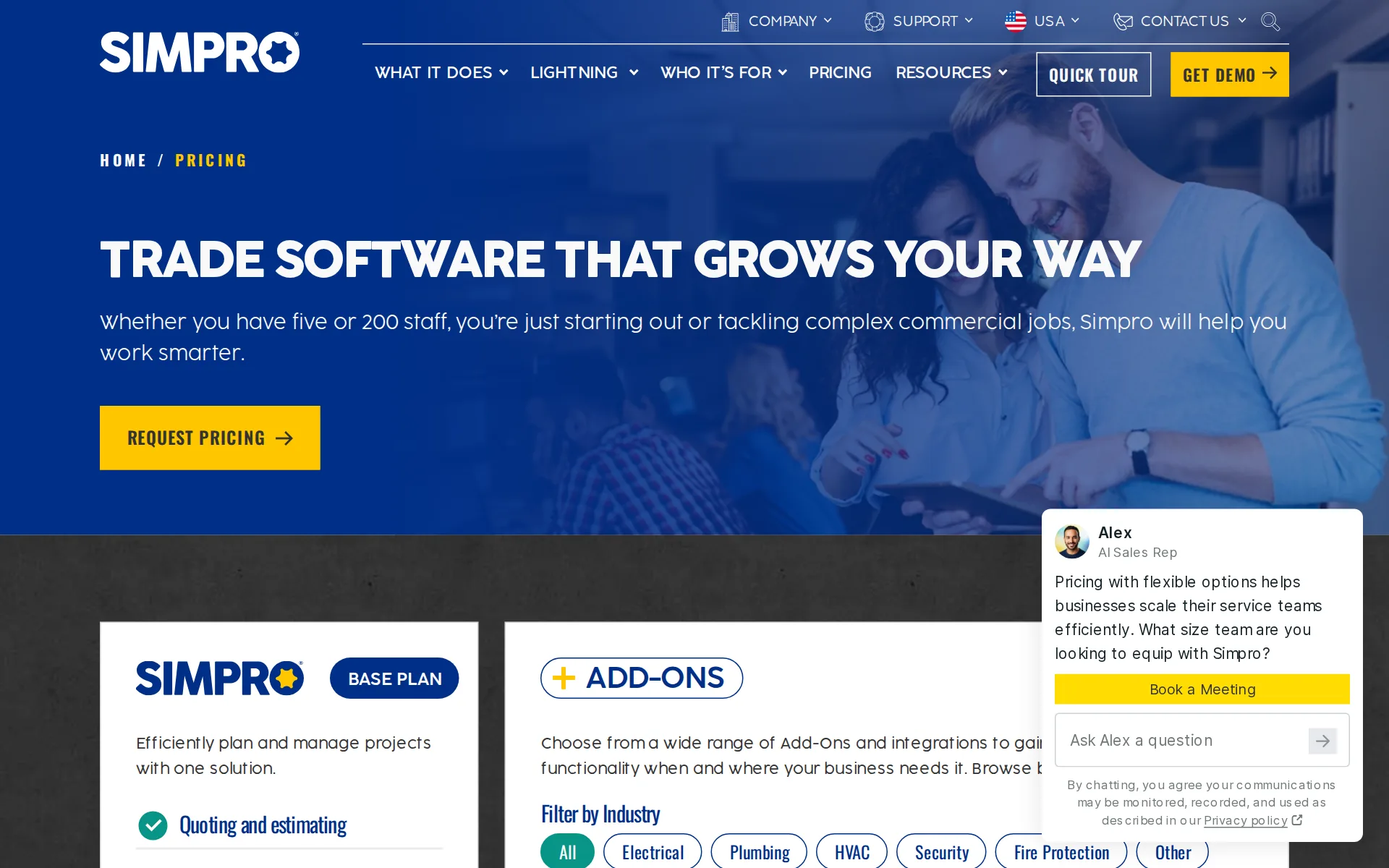
Pricing page, captured
simprogroup.com/pricing, checked
What we checked on Simpro
Quote only
Every plan is quoted by sales: the pricing page shows one unpriced BASE PLAN with a Request Pricing button, and the vendor directs buyers to its sales team for a tailored solution.
Get in touch with our sales team for a tailored solution to help you scale without compromise.
simprogroup.com/featuresChecked
What the price is based on
Priced per user per month, and technicians need a separate mobility licence to log in to the mobile app; independent reviewers report office and mobile licences are billed separately, but no rates are published.
You can log in to Simpro Mobile with your Simpro Premium login credentials only if you are assigned a mobility licence.
Setup or onboarding fee
Data migration and system setup are sold through a chargeable Professional Services engagement priced per business, while the pricing table also lists custom training and implementation as part of the offer; no mandatory setup fee amount is published.
If you’re a veteran Simpro user strapped for time, allow us to help. For a fee, the Professional Services team can help hone your operations through…
Card processing rate
Simpro Payments charges a per-transaction cost the vendor describes as transparent but never prints, saying rates vary by payment method and location; Stripe and Square integrations are listed as alternatives.
Simpro offers a transparent and competitive fee structure, with no hidden fees or unexpected surprises. We provide you with a straightforward cost…
HVAC
Simpro runs dedicated industry pages for HVAC, plumbing, electrical, pest control and pool service, which the industries index links directly
A solution for every industry
simprogroup.com/industriesChecked
Plumbing
Simpro runs dedicated industry pages for HVAC, plumbing, electrical, pest control and pool service, which the industries index links directly
On the page: Industries hub page heading, as quoted in a search result listing Landscaping, Cleaning Services, Pest Control and Pool Service; HVAC, Plumbing and Electrical have their own pages
simprogroup.com/industriesChecked
Electrical
Simpro runs dedicated industry pages for HVAC, plumbing, electrical, pest control and pool service, which the industries index links directly
On the page: Industries hub page heading, as quoted in a search result listing Landscaping, Cleaning Services, Pest Control and Pool Service; HVAC, Plumbing and Electrical have their own pages
simprogroup.com/industriesChecked
Cleaning
landscaping and cleaning are named but unlinked, and handyman work is not named.
On the page: Industries hub page heading, as quoted in a search result listing Landscaping, Cleaning Services, Pest Control and Pool Service; HVAC, Plumbing and Electrical have their own pages
simprogroup.com/industriesChecked
Pest control
Simpro runs dedicated industry pages for HVAC, plumbing, electrical, pest control and pool service, which the industries index links directly
On the page: Industries hub page heading, as quoted in a search result listing Landscaping, Cleaning Services, Pest Control and Pool Service; HVAC, Plumbing and Electrical have their own pages
simprogroup.com/industriesChecked
Pool service
Simpro runs dedicated industry pages for HVAC, plumbing, electrical, pest control and pool service, which the industries index links directly
On the page: Industries hub page heading, as quoted in a search result listing Landscaping, Cleaning Services, Pest Control and Pool Service; HVAC, Plumbing and Electrical have their own pages
simprogroup.com/industriesChecked
Handyman
landscaping and cleaning are named but unlinked, and handyman work is not named.
On the page: Industries hub page heading, as quoted in a search result listing Landscaping, Cleaning Services, Pest Control and Pool Service; HVAC, Plumbing and Electrical have their own pages
simprogroup.com/industriesChecked
Features for one trade
The pool service page documents chemical readings and dosages, filter cleanings and pool specs in site history, and the mobile app records asset test and service history, failure points and equipment notes for HVAC-style equipment.
readings and dosages, filter cleanings, chemical readings and more
Schedule and calendar
The office sees colour-coded job statuses in day, week, month and project views and can drag and drop to change the time, date or assigned field staff member.
Live scheduling updates
Technician app
Simpro Mobile gives field staff their assigned jobs, site history, customer details and job notes, and pushes their updates back to the office in real time on Apple and Android.
Update job details, access site and asset history, view timesheets and present quotes with ease.
Route planning
The homepage says it assigns the closest qualified technician and optimizes routes between sites; how stop order is calculated is not described.
Assign the closest qualified technician, optimize routes, and keep your team moving between sites.
simprogroup.comChecked
Where the trucks are
Live vehicle locations on a map come from Simtrac 360, a fleet tracking add-on that needs a tracker fitted in each vehicle. The mobile app does geostamp technician actions, even offline.
Monitor your fleet in real time, filter vehicles by operating status, review vehicle details, and replay daily trip histories.
Texts to customers
Automatic SMS notifications and schedule notifications to customers need the Simpro SMS add-on plan, and two-way replies need Lightning. No on-my-way message with a live arrival time is described.
Using notifications, for example, to regularly remind employees and customers of meetings.
Maintenance plans and recurring jobs
Recurring jobs and maintenance contracts are managed in the base product, and an accepted quote can be converted straight into a recurring job; the Maintenance Planner add-on adds asset-driven preventative scheduling.
Toggle ON/OFF for Automated Job Creation. This setting controls whether jobs are automatically created once the due date is reached.
Checklists, photos and signatures
Technicians add photos and notes, run pre and post audits and capture customer signatures in the app; a custom form builder is the separate Digital Forms add-on.
Capture staff and customer signatures and email a signed job card directly to any contact
Works without signal
Simpro Mobile keeps working with poor or no signal and queues changes until it reconnects. Offline it cannot refresh service data, create purchase orders or receive notifications, and time blocks are limited to the current week.
Offline functionality
Quotes and estimates
Quotes are built in the office or on site, accepted online by the customer, then converted into a single or recurring job without re-entry.
Email quotes and invoices to the customer
Price book and options
Quotes draw on catalogue items, pre-builds and synced supplier pricing, and a technician can present multiple quote options with standard service fees, discounts or add-on pricing.
Offer multiple quote options such as basic, intermediate and premium
Invoices
Technicians invoice from the job in the field, and Simpro Payments adds automated payment links and reminders for unpaid invoices.
Invoice and accept payments in the field, with different options including cash or credit card payments
Card and bank payments
Customers pay by card, digital wallet or bank direct debit via payment links or the Customer Portal, and technicians take Tap to Pay or terminal payments on the phone.
With the Tap to Pay feature on Simpro Mobile, your technicians can accept contactless payments directly from their mobile device without any extra…
Fast payouts
Payouts reach your bank on the Stripe schedule: up to 2 business days in Australia and the US, 4 in New Zealand and 7 calendar days in the UK. No same-day instant payout option or fee is described.
It may take between two-seven business days for the money to land in your account if processing payments through Stripe depends on your bank and…
Customer financing
A buy-now-pay-later collection method lets customers pay over time while the business is paid in full upfront, but the vendor does not name the lender or publish its terms.
With Simpro Payments, you can offer your customers the option to pay using Buy Now, Pay Later services, such as Afterpay and Klarna.
Parts and inventory
Stock is tracked in real time across multiple locations with low-stock alerts, digital stocktakes, allocation to jobs and visibility from the field.
Inventory management
Online booking
Customers with a portal login can book a job in for service and request quotes online; no website widget or Google booking link is described.
They can pay invoices, edit their contact and site information and book a job in for service.
Customer portal
The Customer Portal shows quotes, jobs, invoices and assets, lets customers pay and update their own details, and sits alongside employee and contractor portals.
a centralized location for your customers to quickly and securely view quotes, past and pending jobs, invoices, assets and other important information
Review requests
Review collection is handled by a third-party integration with Podium listed on the pricing page; Simpro documents no native post-job Google review request of its own.
Online reviews: Podium
simprogroup.com/pricingChecked
Timesheets
Technicians clock on and off, pause work and add travel time in Simpro Mobile, with billable versus non-billable hours tracked; the vendor names no payroll destination for the hours.
Clock on and off daily
Technician commissions
Commission tiers, with an advanced option, calculate a percentage on the job's sell price, and you choose the trigger that makes it a cost. A commission report tracks the totals, but commissions apply only to staff given a Salesperson profile.
You can use commissions in Simpro Premium to calculate the cost of commission payments for your employees.
Leads and follow-ups
Lead management keeps prospective customers in one place with win/loss reporting, and quote reports follow up open quotes and review deadlines.
Use leads to manage potential business opportunities. Once created, you can convert a lead if it is successful, or close a lead if it is unsuccessful.
Marketing campaigns
Automated customer re-engagement campaigns come from the Delight AI marketing agent, a separate add-on whose price is not published; email and Mailchimp or HubSpot integrations cover the rest.
Help your business grow with automatic AI-powered email marketing, designed for field-service businesses.
Several locations
The base plan is listed as multi-company compatible on the pricing page, so several companies or branches run under one setup.
On the page: Base Plan feature list, as quoted in two search results describing the pricing page
simprogroup.com/pricingChecked
Job costing and reports
Profit / Loss reports show how each invoiced job performed, and a contract profitability report covers maintenance contracts. Technician and customer rank reports show which people and customers earn the most.
Advanced Job Costing & Margins
simprogroup.com/pricingChecked
AI features
Lightning AI agents write job notes, summarise each technician's day and completed work, make training videos, suggest schedules and answer data questions in JustAsk. They are for Lightning users only, and Simpro says they may change during development.
JobScribe agent helps you to create professional job notes directly from the job card.
AI call answering add-on
Pulse, part of Lightning, answers inbound calls around the clock and holds bookings in the schedule for staff to confirm; its price is not published.
answers every inbound call 24/7
simprogroup.comChecked
QuickBooks Online
the pages do not distinguish QuickBooks Online from Desktop.
integrates with popular accounting platforms such as QuickBooks, Xero, MYOB, and more
simprogroup.com/pricingChecked
Xero
Invoices, payments and customer and supplier data flow from Simpro to QuickBooks and Xero, with Sage and MYOB also listed
On the page: Pricing page accounting integrations text, as quoted in a search result
simprogroup.com/pricingChecked
Zapier and API
A way for other software to connect is listed in the base plan's integrations, with a developer centre carrying full endpoint documentation, code examples and a forum, and Zapier is also supported.
Simpro API provides a RESTful interface to seamlessly view, create, and modify resources on any Simpro Premium builds.
Canada
Simpro sells into the US, Canada, UK and Ireland, Australia and New Zealand with local sales lines and offices, and supports bank transfer, Bacs and BECS direct debit for those regions
How to Set Up GST / PST - Canada Only
Australia
Simpro sells into the US, Canada, UK and Ireland, Australia and New Zealand with local sales lines and offices, and supports bank transfer, Bacs and BECS direct debit for those regions
On the page: Help guide search results for 'GST'; US Taxify and Kintsugi pages marked 'US Only' on the Integrations page; UK VAT and CIS articles in search for 'VAT'
Sign up without a sales call
Buying is sales-led: the pricing page offers only Request Pricing, the demo page is a contact form, and the vendor tells buyers to reach its sales team for a tailored solution.
Chat to our team of tech gurus to discover a solution to suit you.
simprogroup.com/industriesChecked
Help getting set up
Simpro runs a formal implementation, with pre-implementation documents and accounting checklists, data imports from CSV or your accounting package, and a post-implementation guide. Review sites say a separate fee is charged for it.
Before we begin implementing Simpro Premium into your business
Support
Support teams in three regions are advertised 24 hours, 6 days a week, but the contractual support schedule commits only to business-day hours and calls response times goals.
available 24 hours, 6 days a week
simprogroup.com/pricingChecked
Simpro alternatives
All 9 alternatives6 more alternatives
5 of the 9 publish a price.
- ServiceTitanOn quoteAll-in-one field service platform for residential and commercial trade contractors, priced per technician on quote.
- BuildOpsOn quoteField service and project software for commercial mechanical, electrical and plumbing contractors.
- Estimate RocketFrom $139 a monthContractor platform with trade-specific estimate builders, proposals, client portal and project tracking.
- Service AutopilotFrom $49 a month billed annuallyRoute-heavy service business software built around Automations workflows and two-way QuickBooks sync.


Sources and changes
Last changed
Sources52
- simprogroup.com/features/payments
- simprogroup.com/pricing
- play.google.com/store/apps/detailsIndependent source
- simprogroup.com/
- simprogroup.com/features
- simprogroup.com/features/field-service-mobile-app
- simprogroup.com/features/improve-cashflow
- apps.apple.com/us/app/simpro-mobile/id1419936837Independent source
- helpguide.simprogroup.com/articles
- helpguide.simprogroup.com/articles
- simprogroup.com/features/portals
- simprogroup.com/industries
- simprogroup.com/resources/professional-services
- developer.simprogroup.com/
- helpguide.simprogroup.com/
- helpguide.simprogroup.com/articles
- helpguide.simprogroup.com/articles
- helpguide.simprogroup.com/articles
- helpguide.simprogroup.com/articles
- helpguide.simprogroup.com/articles
- helpguide.simprogroup.com/articles
- helpguide.simprogroup.com/articles
- helpguide.simprogroup.com/articles
- helpguide.simprogroup.com/articles
- helpguide.simprogroup.com/articles
- helpguide.simprogroup.com/articles
- helpguide.simprogroup.com/articles
- helpguide.simprogroup.com/articles
- helpguide.simprogroup.com/articles
- helpguide.simprogroup.com/articles
- helpguide.simprogroup.com/articles
- helpguide.simprogroup.com/articles
- helpguide.simprogroup.com/articles
- helpguide.simprogroup.com/articles
- helpguide.simprogroup.com/articles
- helpguide.simprogroup.com/articles
- helpguide.simprogroup.com/articles
- helpguide.simprogroup.com/articles
- simprogroup.com/features/crm-for-field-service
- simprogroup.com/features/delight
- simprogroup.com/features/estimating-software
- simprogroup.com/features/manage-your-people
- simprogroup.com/features/multi-company
- simprogroup.com/features/reporting
- simprogroup.com/features/scheduling-software
- simprogroup.com/features/simtrac-360
- simprogroup.com/features/sms-messaging
- simprogroup.com/industries/pool-service-software
- helpguide.simprogroup.com/search
- helpguide.simprogroup.com/search
- helpguide.simprogroup.com/search
- simprogroup.com/solutions/simpro-premium
What changed on this page2
- Field features, terms
- Field features, terms
Similar in Field service software
See all in Field service software
- SingleOpsTree care business management software from Granum: proposals, scheduling, crew work orders, invoicing and payments.
- SkimmerPool-service software with water chemistry tools and per-serviced-location pricing.
- SuccesswareTrade business software with its own general ledger and payables built in, not a QuickBooks sync.
- SynchroteamMobile team management software with a free administrator account and paid technician logins.


From our research
- How to choose field service management softwarePick on what the crew pays a month, how easily you can cancel and take your data, QuickBooks sync and whether it is built for your trade.
- Jobber vs Housecall Pro: what a 5- and 10-person crew paysJobber costs $199 a month for 5 users and $299 for 10. Housecall Pro is $299 and $799 on Essentials. Crew prices and the features that differ, Nov 2026.
- What field service software costs and where it jumpsLawn Buddy and ServiceM8 have free plans, several paid plans are cheap to start, and the price jumps with fieldd.
Is Simpro yours?
It's free and marks the page as verified. You confirm it with an email at simprogroup.com. Claim this listing
Report an error if a fact is wrong.