
ServiceM8 in our research
ServiceM8 price and terms
Terms
- Free plan
- YesYesFree plan: $0/mo, 1 user, 30 jobs per month, for solo operators
- Sign up without sales
- YesYes
The terms in full
bonus jobs can be earned by accepting card payments. A separate 14-day free trial of all features needs no credit card.
For AI agents
- API
- Yes
What needs a higher plan
- Premium
- Cost for 5 users a month, Job costing and reports
- Premium Plus
- Cost for 10 users a month
- Growing
- Features for one trade
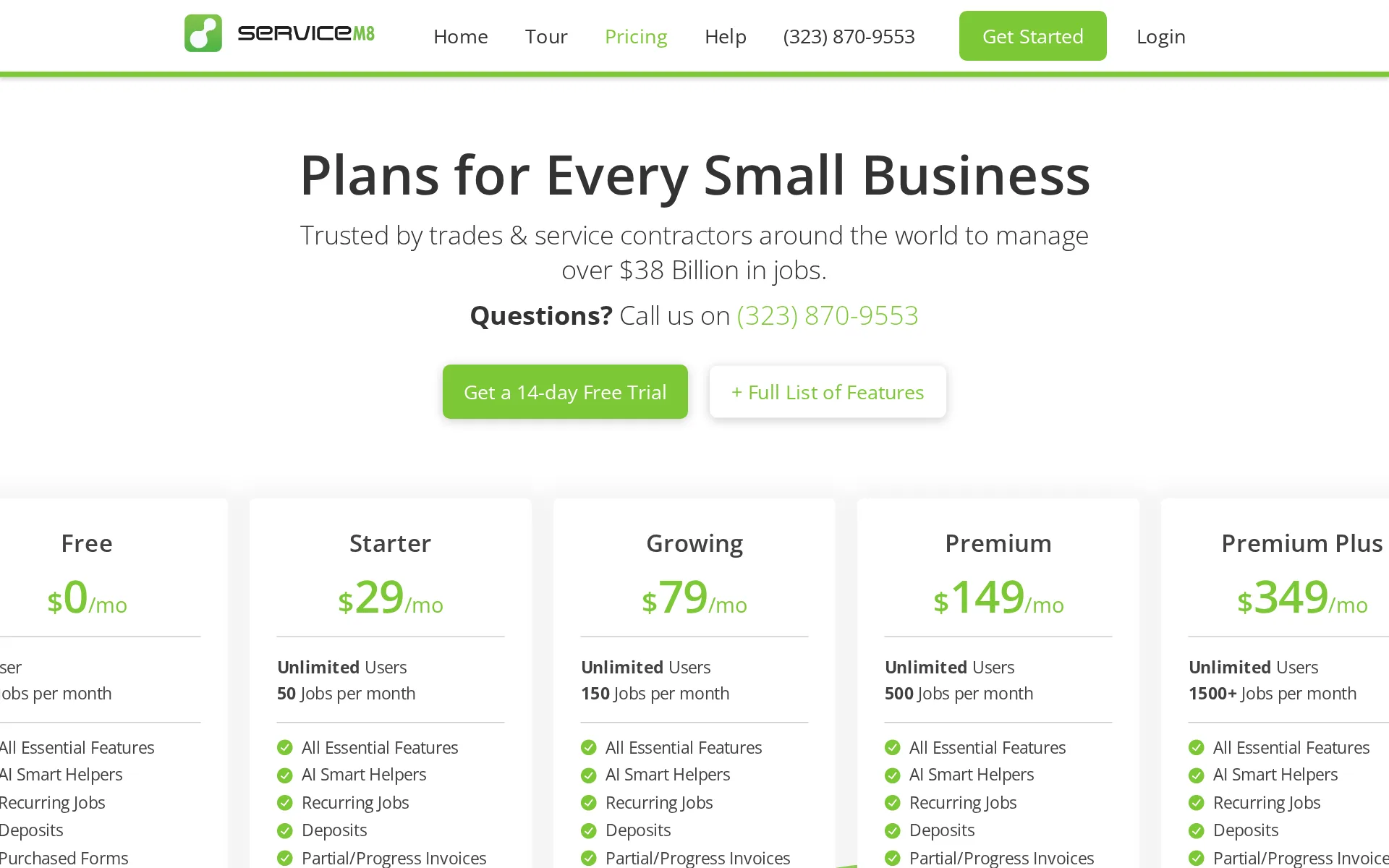
Pricing page, captured
servicem8.com/us/pricing, checked
All plans and limits
| Plan | Price | Main limits |
|---|---|---|
| Free | $0 a month | 30 Jobs per month; Users: 1 User; AI Helper Assists: 10/day |
| Starter | $29 a month | 50 Jobs per month; Unlimited Users; 100+ SMS per month |
| Growing | $79 a month | 150 Jobs per month; Unlimited Users; 300+ SMS per month |
| Premium | $149 a month | 500 Jobs per month; Unlimited Users; 1000+ SMS per month |
| Premium Plus | From $349 a month | 1500+ Jobs per month; Unlimited Users; 3000+ SMS per month |
Read from servicem8.com/pricing.
What we checked on ServiceM8
Cost for 5 users a month
$149 a month on Premium for 5 users. Free ($0) holds up to 30 jobs a month; the workload priced has 350 jobs a month. Starter ($29) holds up to 50 jobs a month; the workload priced has 350 jobs a month. Growing ($79) holds up to 150 jobs a month; the workload priced has 350 jobs a month.
Premium $149/mo Unlimited Users 500 Jobs per month
Cost for 10 users a month
$349 a month on Premium Plus for 10 users. Free ($0) holds up to 30 jobs a month; the workload priced has 780 jobs a month. Starter ($29) holds up to 50 jobs a month; the workload priced has 780 jobs a month. Growing ($79) holds up to 150 jobs a month; the workload priced has 780 jobs a month. Premium ($149) holds up to 500 jobs a month; the workload priced has 780 jobs a month.
Premium Plus $349/mo Unlimited Users 1500+ Jobs per month
Cost for one person a month
A one-person business pays nothing: the Free plan covers one user and 30 jobs a month and still schedules, quotes, invoices and takes card payment, with card fees charged separately.
Yes! The Free Plan is completely free for solo operators. This plan provides the necessary tools to efficiently manage up to 30 jobs a month.
servicem8.com/us/pricingChecked
Promotion and regular price
none. The US pricing page shows plain monthly prices with no promotion and no yearly price shown per month; Starter is $29 a month, and the page has no annual billing toggle.
Starter $29/mo Unlimited Users 50 Jobs per month
servicem8.com/us/pricingChecked
Quote only
Every plan on the page carries a published monthly figure, from the free tier up to Premium Plus, so nothing is held back for a sales conversation and no "contact us" tier appears.
Simple, affordable pricing. No hidden fees. No contracts. No catch.
servicem8.comChecked
What the price is based on
It is a flat monthly price with unlimited user logins on paid plans, metered instead by job credits: 50, 150, 500 or 1500-plus new jobs a month depending on the plan.
These are “job credits” — every time you create a new job card, it uses a job credit. For example, with the Growing plan, you can create 150 new jobs…
servicem8.com/us/pricingChecked
Adding a user
Adding a technician costs nothing on any paid plan, as logins are unlimited; only the Free plan caps you at a single user, so the first hire forces the move to Starter.
Once you have a team and upgrade to a paid plan, you can set up as many user logins as required.
servicem8.com/us/pricingChecked
Setup or onboarding fee
No setup charge is required: the vendor publishes do-it-yourself guides and videos, and paid help from an independent partner is offered as the alternative option rather than a condition.
There are two main options to get started: 1) you can DIY with our self-serve learning resources, or 2) you can pay one of our independent ServiceM8…
servicem8.com/us/pricingChecked
Card processing rate
ServiceM8 Pay charges 3.10% plus 30c on standard domestic cards and 4.60% plus 30c on international ones in the US; the pages do not say whether you may use another processor instead.
On the page: ServiceM8 Pay, rates table
HVAC
There are dedicated industry pages for HVAC, plumbing, electrical, lawn care, cleaning, pest control and pool service, but the complete industry index offers no handyman page, only a catch-all "Other".
Select your industry below to see how ServiceM8 works for your industry.
servicem8.com/industriesChecked
Plumbing
There are dedicated industry pages for HVAC, plumbing, electrical, lawn care, cleaning, pest control and pool service, but the complete industry index offers no handyman page, only a catch-all "Other".
On the page: Industries index, intro line above the full industry grid
servicem8.com/industriesChecked
Electrical
There are dedicated industry pages for HVAC, plumbing, electrical, lawn care, cleaning, pest control and pool service, but the complete industry index offers no handyman page, only a catch-all "Other".
On the page: Industries index, intro line above the full industry grid
servicem8.com/industriesChecked
Lawn care and landscaping
There are dedicated industry pages for HVAC, plumbing, electrical, lawn care, cleaning, pest control and pool service, but the complete industry index offers no handyman page, only a catch-all "Other".
On the page: Industries index, intro line above the full industry grid
servicem8.com/industriesChecked
Cleaning
There are dedicated industry pages for HVAC, plumbing, electrical, lawn care, cleaning, pest control and pool service, but the complete industry index offers no handyman page, only a catch-all "Other".
On the page: Industries index, intro line above the full industry grid
servicem8.com/industriesChecked
Pest control
There are dedicated industry pages for HVAC, plumbing, electrical, lawn care, cleaning, pest control and pool service, but the complete industry index offers no handyman page, only a catch-all "Other".
On the page: Industries index, intro line above the full industry grid
servicem8.com/industriesChecked
Pool service
There are dedicated industry pages for HVAC, plumbing, electrical, lawn care, cleaning, pest control and pool service, but the complete industry index offers no handyman page, only a catch-all "Other".
On the page: Industries index, intro line above the full industry grid
servicem8.com/industriesChecked
Handyman
There are dedicated industry pages for HVAC, plumbing, electrical, lawn care, cleaning, pest control and pool service, but the complete industry index offers no handyman page, only a catch-all "Other".
On the page: Industries index, intro line above the full industry grid
servicem8.com/industriesChecked
Features for one trade
Pest control gets bait station and trap tracking with inspection reports, and asset management holds equipment service history for HVAC; the pages say nothing about pool water readings or a flat-rate price book.
Record the location of pest control assets on a client's site, such as traps or bait stations. Complete service & inspection forms against assets,…
Schedule and calendar
The office sees the whole team's day and drags jobs onto a staff member and time, with urgent work dropped straight onto whoever is nearest and staff notified of the change.
Drag-and-drop Scheduling Simply drag new jobs onto the desired time and staff member to schedule them.
Technician app
Field staff get the job card with client details, the full history of past work, notes and photos on iPhone, iPad or Android, and can quote, invoice and take payment from the same screen.
Create jobs, schedule work, communicate with clients, send quotes and invoices, and take payment on site.
servicem8.comChecked
Route planning
Auto Routing reorders one staff member's day in a single click to cut driving, and it is listed on every plan including the free one rather than held back for higher tiers.
With a single click, the Auto Routing add-on can optimise a staff member's route and schedule for the day, saving time and fuel.
servicem8.com/us/pricingChecked
Where the trucks are
Live staff positions, arrival estimates and a dispatch map come on every plan at no extra charge, and a shift report replays a technician's whole day of jobs, visits and travel.
Staff GPS & Status View live staff locations, ETA's & job progress as technicians navigate to jobs & check in on arrival. All plans
servicem8.com/us/pricingChecked
Texts to customers
Booking confirmations and reminders go out by email or text, an on-the-way message carries an arrival estimate, and clients can follow the technician's journey on a map.
On the Way SMS Automatically SMS clients to notify you're on the way to the job, including an estimated time of arrival. All plans
servicem8.com/us/pricingChecked
Maintenance plans and recurring jobs
Repeat maintenance work is set up once and re-creates and schedules itself at monthly, quarterly or annual intervals on every plan; the pages do not describe selling a priced membership plan.
Recurring Jobs & Maintenance Scheduling Create a job once and set it to re-create and schedule itself over time, automatically. All plans
servicem8.com/us/pricingChecked
Checklists, photos and signatures
Checklists, photos, videos and a signature on the phone are on every plan; building your own inspection or compliance forms needs Growing, though bought forms work even on the free plan.
Use checklists and task lists to ensure jobs are done right the first time, every time.
Works without signal
The app opens job information with no signal at all and pushes anything the technician changed back up once the phone is in range again, on every plan.
Field staff can access all job information without internet connectivity, and any updates will automatically sync when connectivity is restored.
Quotes and estimates
Quotes are sent for the customer to view and accept online or sign remotely, and an accepted quote becomes the live job without using up another monthly job credit.
Online Quote Acceptance Allow your customers to view and accept your quotes online.
Price book and options
You keep preset materials, services and labour rates, with supplier price lists importing by email, and several priced options can be sent for the customer to choose between.
Quote Options Produce several quote options and send a link for the client to view and choose. All plans
servicem8.com/us/pricingChecked
Invoices
Invoices are produced from the job on site and emailed or texted, with automatic chasing messages for anything unpaid and a live statement link for the customer's open balance.
Automated Payment Follow-ups Set automatic emails & texts to request payment of outstanding invoices. All plans
servicem8.com/us/pricingChecked
Card and bank payments
Customers pay by card or digital wallet from an emailed or texted invoice, and technicians take contactless card payment on site with just the phone; bank transfer is only offered in the UK.
Online Card Payments Email & text online invoices which clients can pay by card, or with Apple Pay. All plans
servicem8.com/us/pricingChecked
Fast payouts
A day's takings land in the bank the next business day as standard, and no separate fee for faster settlement is published anywhere on the payments page.
Payments accepted over the course of the day are deposited to your bank account the next business day.
Online booking
Booking pages sit on your own website or Facebook, give the customer a price, let them pick a time and drop the job into the schedule; a booking from Google search is not described.
Customers can get a live quote, select a time, then book a job straight into your ServiceM8 account, without interacting with your business directly.
Customer portal
Customers get a live link listing every outstanding invoice that updates as they pay, and can scan equipment codes to see details, but no logged-in area holding their quotes and visit history is described.
Live Invoice Statements Send clients a link to all outstanding invoices, updating as invoices are paid & new invoices added. All plans
servicem8.com/us/pricingChecked
Review requests
After a job the system can email or text the customer for feedback and invite the happy ones to post a Google review, on every plan through the feedback add-on.
Feedback & Google Reviews Automate email & texts to clients requesting feedback, or invite them to leave a Google review.
Timesheets
Staff clock on and off shifts and check in and out of jobs in the app, with the week's hours exportable to Xero, QuickBooks Online or MYOB for payroll, plus a sync to Deputy.
Auto Payroll Timesheets Export staff timesheets to Xero, QuickBooks Online or MYOB to streamline your payroll.
Leads and follow-ups
Enquiries become job cards that move from quote to live work, and a sequence of up to five automatic emails and texts chases a quote that has not been accepted.
Build a personalised sequence of up to five email & SMS follow ups to clients if they haven't accepted a quote, or paid an invoice.
Marketing campaigns
Customer lists sync daily to Mailchimp so newsletters are sent from there, which means the campaign cost is Mailchimp's; the vendor describes no built-in email, text or postcard campaigns of its own.
Mailchimp Email Marketing Daily syncing of all client emails in ServiceM8 with your MailChimp mailing list - just set and forget.
Job costing and reports
Profit per job after labour and materials is a Premium feature, with markup billing alongside it, so the two cheaper paid plans show revenue reports but not what the job actually made.
Job Profitability Get an instant gauge on how profitable a job will be, then see how much you made after the job's done. Premium
servicem8.com/us/pricingChecked
AI features
On every plan it drafts quote and invoice descriptions and billing item lists, writes emails and texts, suggests booking times, builds reports from a typed request, and answers job questions by voice.
ServiceM8 Chat is your voice-activated, AI CRM assistant, capable of actioning tasks, analysing the job card, and giving answers in seconds.
AI call answering add-on
ServiceM8 Phone Agent is an AI assistant that handles business phone calls, sold as part of the paid ServiceM8 Phone add-on: Connect Plus at $32/mo or Unlimited at $119/mo, not the $19 Connect plan. The page does not say outright that it books jobs.
A simple to use, AI assistant for your business, who can handle your business phone calls, any way you want — just like a real staff member.
servicem8.com/phoneChecked
QuickBooks Online
Clients, items, invoices and payments sync to QuickBooks Online and Xero on every plan, MYOB too
QuickBooks Online & Xero Sync clients, items, invoices & payments to your accounting package to save time & streamline. All plans
servicem8.com/us/pricingChecked
QuickBooks Desktop
the pages never mention QuickBooks Desktop, so that version is not established either way.
On the page: Plan comparison minimum-plan list, Connectivity section
servicem8.com/us/pricingChecked
Xero
Clients, items, invoices and payments sync to QuickBooks Online and Xero on every plan, MYOB too
On the page: Plan comparison minimum-plan list, Connectivity section
servicem8.com/us/pricingChecked
Zapier and API
Zapier links it to other apps on every plan, n8n is supported, and a documented developer connection for other software starts at the Starter plan rather than the free one.
Zapier Build customised connections between ServiceM8 and +3000 supported apps. All plans
servicem8.com/us/pricingChecked
United States
Helping trade contractors succeed around the world, from Australia, the United Kingdom, and Canada, to the United States and New Zealand.
On the page: AI page, "What Our Customers Say" intro line
Canada
It is sold in the US, Canada, the UK and Australia with its own priced plans in each currency and local card rates
Helping trade contractors succeed around the world, from Australia, the United Kingdom, and Canada, to the United States and New Zealand.
United Kingdom
Helping trade contractors succeed around the world, from Australia, the United Kingdom, and Canada, to the United States and New Zealand.
On the page: AI page, "What Our Customers Say" intro line
Australia
It is sold in the US, Canada, the UK and Australia with its own priced plans in each currency and local card rates
On the page: AI page, "What Our Customers Say" intro line
Free trial or free plan
You can run your own jobs free two ways: a 14-day trial with every feature switched on and no card needed, and a standing free plan for one person doing up to 30 jobs a month.
No. You can create an account and trial ServiceM8 for 14 days, free. You only need to provide payment details if you want to go ahead and subscribe…
servicem8.com/us/pricingChecked
Sign up without a sales call
You create the account and set it up yourself from published guides and videos, with no demo booking in the way; paid partner help is an option rather than a step.
Do it yourself Create an account and follow the simple guides to get started yourself.
servicem8.comChecked
Help getting set up
Hands-on setup, template work, form building and team training come from independent partners you pay separately, so help exists but is not included in the subscription.
Yes. We have ServiceM8 Partners across the US who can help you from initial consultation through to setup and training.
servicem8.com/us/pricingChecked
Contract and cancelling
It is month to month with no lock-in: you move up or down a plan whenever you like and unused credit is applied pro rata, and no cancellation call is mentioned.
There are no lock-ins with ServiceM8’s pricing. You can upgrade and downgrade between plans at any time.
servicem8.com/us/pricingChecked
Support
Chat and email support are staffed around the clock and free, and there is a help centre and video roadmap; the pages do not promise a support phone line, only sales numbers.
We have 24/7 chat & email support — you can start a chat right here on the website, or send us an email at support@servicem8.com.
servicem8.com/us/pricingChecked
Getting your data out
Your account data can be exported to build your own reports, and the report builder output can be saved out too, so client, job and invoice records are not locked in.
Job Data Export Export data from your ServiceM8 account and generate custom reports of your own.
ServiceM8 alternatives
All 9 alternatives6 more alternatives
7 of the 9 publish a price.
- ServiceBridgeFrom $24.95 a seat a monthField service suite from a fleet tracking company, with live vehicle GPS built into the dispatch map.
- The Customer FactorFrom $44.95 a monthFlat-rate web and mobile CRM for cleaning and other residential service businesses.
- WEX Field Service ManagementFrom $69 a monthAll-in-one scheduling, dispatch, proposals and payments software for home service contractors.
- Service AutopilotFrom $49 a month billed annuallyRoute-heavy service business software built around Automations workflows and two-way QuickBooks sync.


Sources and changes
Last changed
Sources on servicem8.com10
What changed on this page1
- Field features
Similar in Field service software
See all in Field service software
- ServiceTitanAll-in-one field service platform for residential and commercial trade contractors, priced per technician on quote.
- SimproTrade job management with project costing, inventory and asset maintenance for commercial contractors, sold on quote.
- SingleOpsTree care business management software from Granum: proposals, scheduling, crew work orders, invoicing and payments.
- SkimmerPool-service software with water chemistry tools and per-serviced-location pricing.


Is ServiceM8 yours?
It's free and marks the page as verified. You confirm it with an email at servicem8.com. Claim this listing
Report an error if a fact is wrong.