
ZenMaid in our research
ZenMaid price and terms
Terms
- Free to start
- PartlyNo free plan (limited free use)14-day free trial on every plan
- Sign up without sales
- YesYes
The terms in full
the site does not say whether a card is needed to start. No standing free plan.
For AI agents
- API
- PartlyZenMaid Pro Max
What needs a higher plan
- ZenMaid Pro
- Where the trucks are, Checklists, photos and signatures, Quotes and estimates, Online booking, Technician commissions, Job costing and reports
- ZenMaid Pro Max
- Review requests, Marketing campaigns, Zapier and API, Getting your data out
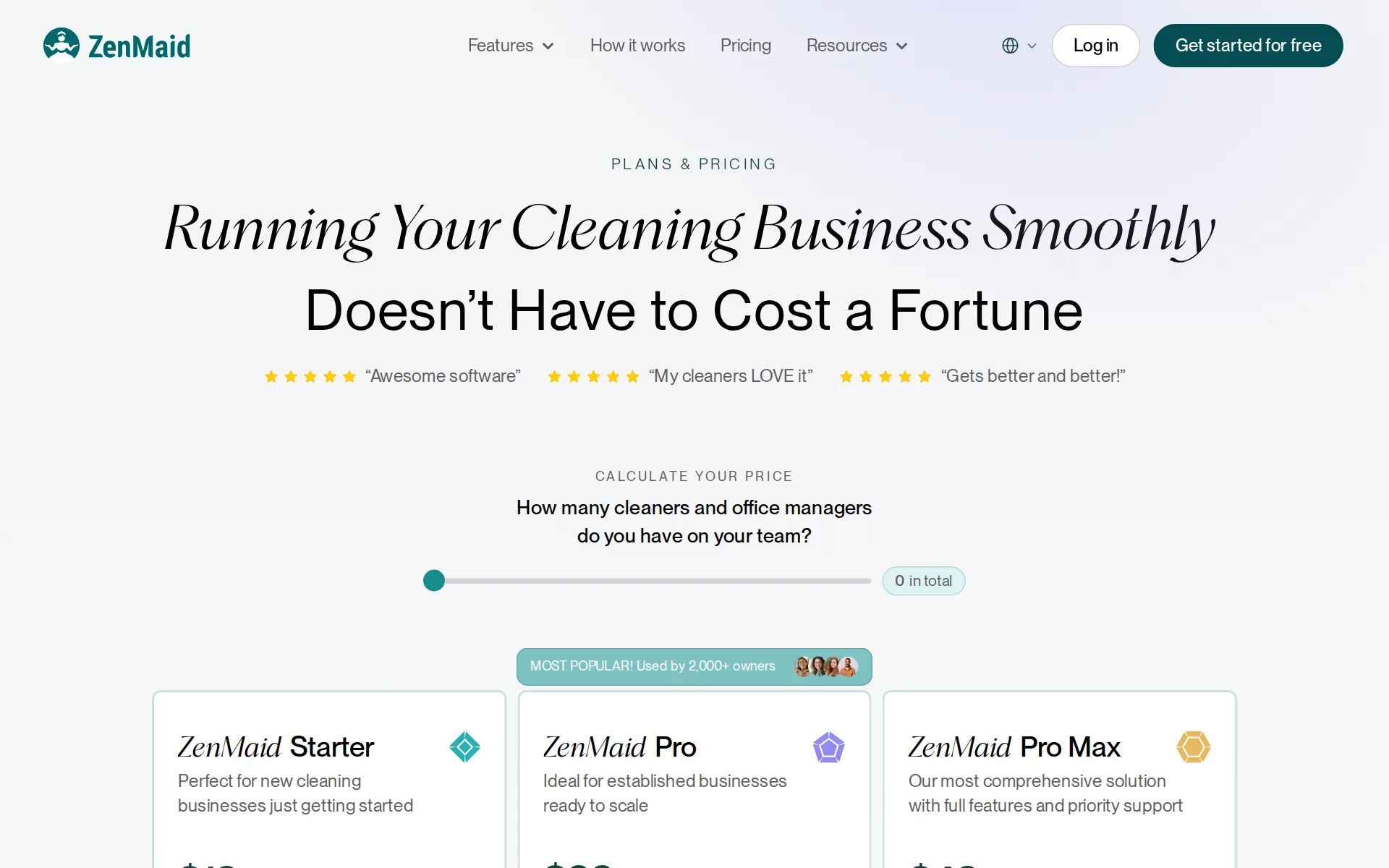
Pricing page, captured
get.zenmaid.com/pricing, checked
All plans and limits
| Plan | Price | Appointments |
|---|---|---|
| ZenMaid Starter | $19 a month | Up to 40 per month |
| ZenMaid Pro | $39 a month | Unlimited per month |
| ZenMaid Pro Max | $49 a month | Unlimited per month |
Read from get.zenmaid.com/pricing.
What we checked on ZenMaid
Cost for one person a month
On the pricing page's team-size slider, one person costs $23 a month on Starter, which schedules, invoices and takes cards but stops at 40 appointments a month. The booking form that quotes customers needs Pro, which costs $53 a month for one person. SMS charges are extra.
$19 + $4 per cleaner per month
get.zenmaid.com/pricingChecked
Promotion and regular price
none - every figure on the page is a plain monthly price shown per month with no promotional or first-months rate, no annual billing control exists anywhere on the pricing page, and the FAQ states plans run month to month with no signature.
No, you can try any of ZenMaid’s plans on a month-to-month agreement, no signature necessary.
get.zenmaid.com/pricingChecked
Quote only
All three plans (Starter, Pro and Pro Max) show a public price that changes with team size on a slider. Pro Max adds a 'Talk to our team' button but still has a published price, and no plan is sold only through sales.
ZenMaid Pro Max Our most comprehensive solution with full features and priority support $49 / month
get.zenmaid.com/pricingChecked
What the price is based on
Each plan has a flat monthly base plus a charge for every person on the team. The slider counts cleaners and office managers together. Starter is $19 plus $4 a person, Pro is $39 plus $14, and Pro Max is $49 plus $24.
How many cleaners and office managers do you have on your team?
get.zenmaid.com/pricingChecked
Adding a user
Each extra team member adds a fixed monthly amount instead of forcing a move to a higher plan: $4 on Starter, $14 on Pro and $24 on Pro Max. The slider reads these figures up to 20+ people, which is the top of its range.
On the page: ZenMaid Starter card price cell with the slider at 20+
get.zenmaid.com/pricingChecked
Setup or onboarding fee
Data migration and setup are done by ZenMaid staff at no charge on every plan, including file clean-up and verification, with no onboarding package sold separately.
Concierge onboarding is free on every ZenMaid plan
get.zenmaid.com/onboardingChecked
Card processing rate
ZenMaid adds no fee of its own to card payments. You process through your own Stripe or Square account and pay their rates, which the ZenMaid site does not state. No in-house processor is offered.
Use the processors you already trust and love with no ZenMaid fees on top.
HVAC
Cleaning only: the vendor describes itself as maid service software for residential home cleaning, and its published page inventory has no HVAC, plumbing, electrical, lawn, pest, pool or handyman pages.
ZenMaid isn’t for every field service business — it’s built specifically for residential and commercial cleaning services.
Plumbing
Cleaning only: the vendor describes itself as maid service software for residential home cleaning, and its published page inventory has no HVAC, plumbing, electrical, lawn, pest, pool or handyman pages.
On the page: FAQ, 'How does ZenMaid compare to Jobber for field service businesses?'
Electrical
Cleaning only: the vendor describes itself as maid service software for residential home cleaning, and its published page inventory has no HVAC, plumbing, electrical, lawn, pest, pool or handyman pages.
On the page: FAQ, 'How does ZenMaid compare to Jobber for field service businesses?'
Lawn care and landscaping
Cleaning only: the vendor describes itself as maid service software for residential home cleaning, and its published page inventory has no HVAC, plumbing, electrical, lawn, pest, pool or handyman pages.
On the page: FAQ, 'How does ZenMaid compare to Jobber for field service businesses?'
Cleaning
Cleaning only: the vendor describes itself as maid service software for residential home cleaning, and its published page inventory has no HVAC, plumbing, electrical, lawn, pest, pool or handyman pages.
On the page: FAQ, 'How does ZenMaid compare to Jobber for field service businesses?'
Pest control
Cleaning only: the vendor describes itself as maid service software for residential home cleaning, and its published page inventory has no HVAC, plumbing, electrical, lawn, pest, pool or handyman pages.
On the page: FAQ, 'How does ZenMaid compare to Jobber for field service businesses?'
Pool service
Cleaning only: the vendor describes itself as maid service software for residential home cleaning, and its published page inventory has no HVAC, plumbing, electrical, lawn, pest, pool or handyman pages.
On the page: FAQ, 'How does ZenMaid compare to Jobber for field service businesses?'
Handyman
Cleaning only: the vendor describes itself as maid service software for residential home cleaning, and its published page inventory has no HVAC, plumbing, electrical, lawn, pest, pool or handyman pages.
On the page: FAQ, 'How does ZenMaid compare to Jobber for field service businesses?'
Features for one trade
Features are cleaning-specific: checklist templates for standard cleans, deep cleans and move-outs, cleaner tips collected with invoices, and per-clean service ratings tied to cleaner profiles.
Choose from ready-made templates for standard cleanings, deep cleans, move-outs, and more — then customize to match your service standards.
Schedule and calendar
The office gets calendar, list, map and dispatch views of the whole team, with cleaners assigned to jobs by click and colour-coded teams for readability.
The easy drag-and-drop scheduling within ZenMaid allows you to create, view and edit jobs in your calendar with simple clicks.
get.zenmaid.comChecked
Technician app
Cleaners get schedules, entry instructions, pet notes, checklists and special requests on iOS and Android, and can add notes and photos back to the appointment.
Cleaners always have entry instructions, pet notes, cleaning checklists, and special requests on hand.
Route planning
A map view helps the office group nearby jobs by hand. ZenMaid's own Jobber comparison marks advanced routing as something it does not offer, saying local teams do not need it, so there is no automatic ordering of stops.
Advanced routing features (Not needed for local teams)
Where the trucks are
GPS is excluded from the entry plan: Starter's own feature list says the mobile app comes without cleaner GPS tracking, which starts on Pro with GPS-stamped clock in and out.
Mobile app with cleaner GPS tracking
get.zenmaid.com/pricingChecked
Texts to customers
ZenMaid sends clients automatic confirmations and reminders, and cleaners send an on-my-way text with one tap. Starter has only a limited set of message templates, and text messages are billed on top of every plan.
ZenMaid sends confirmations, reminders, on-my-way texts, and follow-ups for you — personalized to every client, written in your words, on the…
Maintenance plans and recurring jobs
Recurring cleans are core, with a Spotfinder tool on Pro for slotting new recurring customers; the site does not describe selling paid maintenance or membership plans.
Now, with just a few clicks I can schedule routine clients at many different intervals.
Checklists, photos and signatures
Photos and job notes are in the app on any plan, but digital checklists are a Pro feature, and nothing on the site describes capturing a customer signature.
Digital checklists for your appointments
get.zenmaid.com/pricingChecked
Quotes and estimates
Branded booking forms double as quoting forms that feed the calendar, but they start on Pro; Starter's list does not include them.
Our instant booking forms seamlessly integrate into your website, so clients can get quotes and request services effortlessly.
Invoices
Invoices are created from completed appointments, branded with your logo and colours, and unpaid ones can be resent by email or SMS with a pay link.
Create and manage invoices straight from your calendar. As soon as a job is marked complete, you can generate an invoice.
get.zenmaid.com/invoicingChecked
Card and bank payments
Clients pay by card through an emailed or texted invoice and cards can be stored for later charging; bank transfer is not mentioned anywhere.
Clients pay by card through email or text
Online booking
An embeddable instant booking form takes jobs from your website around the clock and syncs them to the calendar, but it is a Pro feature and Google booking is not mentioned.
High-converting booking forms for your website (with ZenMaid branding)
get.zenmaid.com/pricingChecked
Review requests
Service ratings collect feedback after every clean and let you send happy clients a review link. The pricing page puts service ratings on Pro Max only, while the Housecall Pro comparison says review requests are included at $19.
Service ratings to collect feedback from your customers
get.zenmaid.com/pricingChecked
Timesheets
Cleaners clock in and out in the same app that shows their schedule, with GPS stamps on Pro and payroll reports generated in-product; no external payroll software is named.
Cleaners can clock in and out with the ZenMaid app — in the same place they get their schedule, appointment information, notes, and more.
Technician commissions
The payroll feature works out cleaner pay hourly, per job or as a percentage of the job, which covers revenue-share pay, and it reports earnings by cleaner or job. Payroll starts on Pro, and the site does not mention bonuses.
Pay hourly, by job, or by percentage. ZenMaid tracks cleaner pay based on your setup — no weird workarounds.
Leads and follow-ups
Leads arriving through booking forms become clients with automated follow-ups and reminders, though the vendor describes a searchable contact book rather than named pipeline stages.
Never let a lead go cold — set up automated reminders and confirmations.
Marketing campaigns
Campaigns run outside the product: Mailchimp and Zapier integrations are a Pro Max feature that push clients to your email list, and ZenMaid publishes no cost for the campaigns themselves.
Integrations with Mailchimp and Zapier
get.zenmaid.com/pricingChecked
Job costing and reports
Payroll reports show earnings by cleaner and by job and compare scheduled against actual hours, but reporting starts on Pro and no parts or materials cost is tracked.
Want to know how much you’re spending on payroll for a specific client? ZenMaid’s payroll reports break it down for you.
AI features
The only AI the vendor describes is Zoe, a support assistant answering product questions before a human takes over; no AI writes quotes, summarises jobs or suggests schedules.
Zoe AI handles the quick questions the second you ask. Anything she can’t, our support team picks up
get.zenmaid.com/supportChecked
QuickBooks Online
QuickBooks integration is labelled 'coming soon' on the Pro card, so no plan syncs to QuickBooks Online today. Neither QuickBooks Desktop nor Xero is mentioned, and the vendor says accounting software is still needed alongside ZenMaid.
Quickbooks integration COMING SOON
get.zenmaid.com/pricingChecked
QuickBooks Desktop
QuickBooks integration is labelled 'coming soon' on the Pro card, so no plan syncs to QuickBooks Online today. Neither QuickBooks Desktop nor Xero is mentioned, and the vendor says accounting software is still needed alongside ZenMaid.
On the page: ZenMaid Pro card feature list, last item with 'Coming soon' label
get.zenmaid.com/pricingChecked
Xero
QuickBooks integration is labelled 'coming soon' on the Pro card, so no plan syncs to QuickBooks Online today. Neither QuickBooks Desktop nor Xero is mentioned, and the vendor says accounting software is still needed alongside ZenMaid.
On the page: ZenMaid Pro card feature list, last item with 'Coming soon' label
get.zenmaid.com/pricingChecked
Zapier and API
Zapier connects ZenMaid to other apps on four triggers, but it is a Pro Max feature and the vendor documents no public way for other software to connect; payments data is explicitly excluded.
NOTE: Payment processing (Square, Venmo, etc.) and transferring cleaning costs are not currently supported through Zapier.
get.zenmaid.com/zapierChecked
Australia
ZenMaid sells to US businesses with prices in dollars, and its case studies include owners in Wisconsin, Ohio and Brisbane, Australia.
Based in Brisbane 🇦🇺
get.zenmaid.comChecked
Free trial or free plan
Every plan has a 14-day free trial, and you can import your own clients during it, but there is no standing free plan. After the trial you pay at least the Starter rate.
Yes, when you sign up today you’ll have 14 days free access to the best software on the market for maid services.
get.zenmaid.com/pricingChecked
Sign up without a sales call
Sign-up, trial and plan upgrades all happen in-app without talking to anyone; a demo call is offered but explicitly not required to change plans.
After upgrading your plan, you will immediately gain access to all the features included in it. No need to reach out to ZenMaid’s team.
get.zenmaid.com/pricingChecked
Help getting set up
ZenMaid's team imports your clients, cleaners and recurring schedule from CSV, Excel, PDF or Google Calendar for free on every plan, usually within 2 to 4 business days. Pro and Pro Max also include a free one-to-one optimization call.
our team will move your clients, cleaners, and recurring schedule into ZenMaid for you. It costs nothing, and you do not have to sit through it.
get.zenmaid.com/onboardingChecked
Contract and cancelling
Every plan is month-to-month with no signature, and both trial and subscription can be cancelled from account settings without contacting support.
Yes, you can cancel anytime your free trial and your subscription directly from the settings of your account.
get.zenmaid.com/pricingChecked
Support
Questions go first to the Zoe AI assistant, then to human staff by chat or email (support@zenmaid.com), with Zoom calls on every plan. Starter is chat-only and Pro Max gets priority support. No phone line or support hours are published.
On the page: Hero section, 'Instant Answers from Zoe AI, Fast Responses from Real People'
get.zenmaid.com/supportChecked
Getting your data out
You own your data under the terms of service, but data export is listed as a Pro Max feature, so the two cheaper plans are not told they can export.
Export of your data
get.zenmaid.com/pricingChecked
ZenMaid alternatives
All 9 alternatives6 more alternatives
7 of the 9 publish a price.
- ServiceMonsterFrom $99.99 a monthField service CRM for cleaning and exterior-washing businesses: schedule, dispatch, invoice and market.
- SweptFrom $150 a monthJanitorial software priced per cleaning location with unlimited users, built around proof of work at each site.
- Launch27From $75 a monthBooking form for maid services that quotes by bedrooms or square feet and holds the card before the clean.
- JobberFrom $49 a monthPlans sized by team for home service crews, with a client hub, routing and an add-on AI receptionist.


Sources and changes
Last changed
Sources on get.zenmaid.com17
- /pricing
- /
- /cleaning-business-employee-management
- /cleaning-service-scheduling-software
- /cleaning-booking-software
- /compare/jobber
- /credit-card-processing
- /onboarding
- /support
- /cleaning-business-app
- /cleaning-business-checklist
- /cleaning-company-crm
- /cleaning-service-ratings-software
- /client-communications
- /invoicing
- /terms-of-service
- /zapier
What changed on this page1
- Field features, terms
Similar in Field service software
See all in Field service software
- ArborgoldGreen-industry job software with plant and tree records, chemical logs and crew time in one account.
- BriostackRecurring pest and turf treatment software sold by concurrent login, so you pay for staff signed in simultaneously.
- BuildOpsField service and project software for commercial mechanical, electrical and plumbing contractors.
- CommusoftSoftware for HVAC and generator firms whose maintenance contracts create recurring visits and track response times.


Is ZenMaid yours?
It's free and marks the page as verified. You confirm it with an email at get.zenmaid.com. Claim this listing
Report an error if a fact is wrong.