
Jobber price and terms
Terms
- Free to start
- PartlyNo free plan (limited free use)14 days of full access to all features on the Grow plan, no credit card required
- Sign up without sales
- YesYes
The terms in full
no standing free plan afterwards.
For AI agents
- API
- PartlyConnect
What needs a higher plan
- Connect
- Cost for 5 users a month, Cost for 10 users a month, Route planning, Timesheets, QuickBooks Online, Xero
- Plans above Core
- Texts to customers
- Grow and Plus
- Job costing and reports
- Plus
- Help getting set up
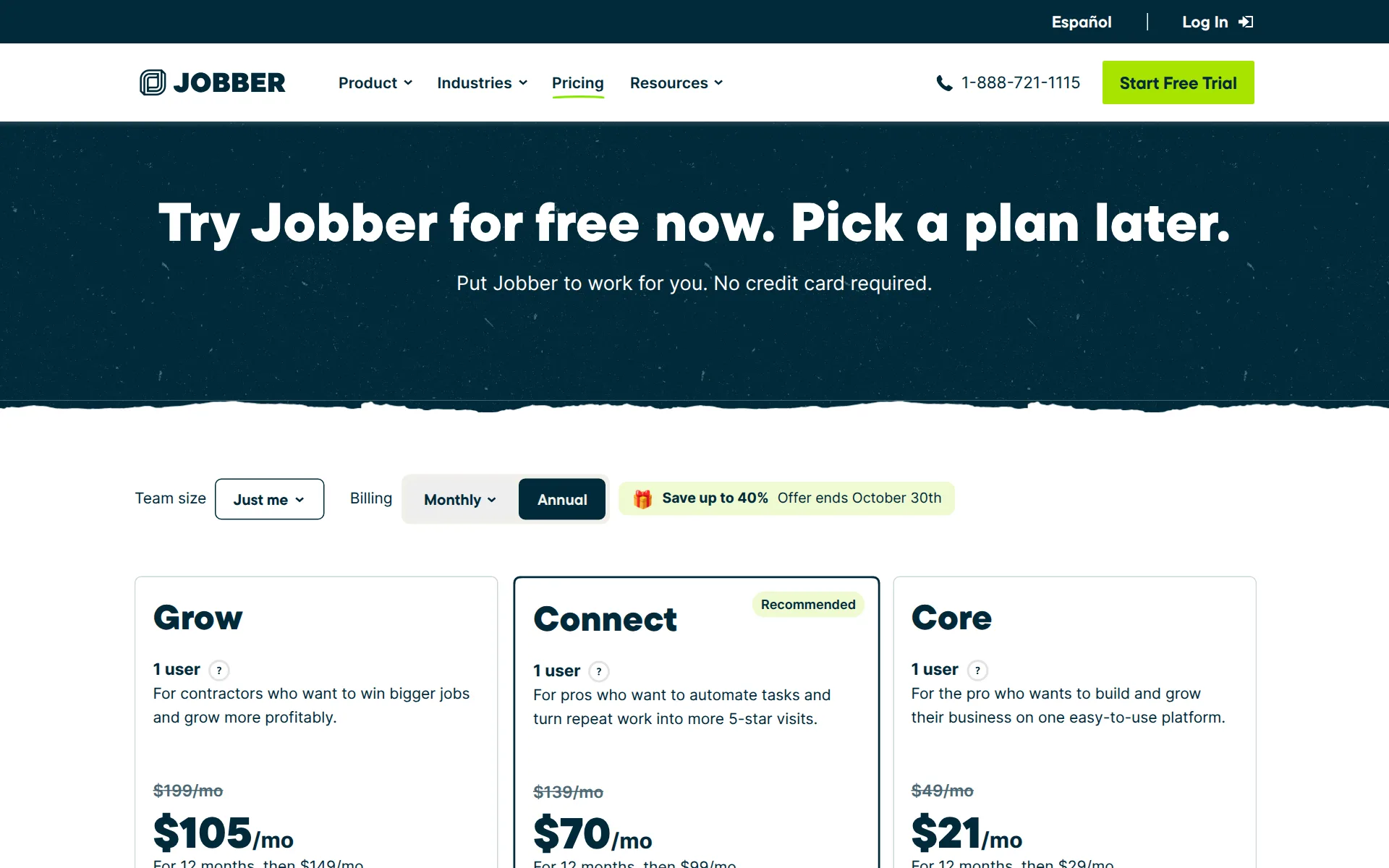
Pricing page, captured
getjobber.com/pricing, checked
What we checked on Jobber
Cost for 5 users a month
$199 a month on Connect (5 users) for 5 users. Counted as one office user and the rest technicians in the field. Connect (1 user) ($139) includes 1 users; these users need 5, and past the allowance you are moved to the next plan.
The team version costs $199/month with no commitment (or $149/month billed annually) and includes 5 users.
Cost for 10 users a month
$299 a month on Connect (10 users) for 10 users. Counted as one office user and the rest technicians in the field. Connect (1 user) ($139) includes 1 users; these users need 10, and past the allowance you are moved to the next plan. Connect (5 users) ($199) includes 5 users; these users need 10, and past the allowance you are moved to the next plan. Grow (1 user) ($199) includes 1 users; these users need 10, and past the allowance you are moved to the next plan.
On the page: Plan price table, Connect 10-user row; fsmadvisor.com 6–10 row agrees
Promotion and regular price
yearly shown monthly: the pricing page headline gives $29 a month, which is Core's rate when billed yearly. The regular month-to-month Core price is $49, according to several third-party pricing reviews that agree with each other.
Jobber Pricing: Plans Starting at $29/Month
getjobber.com/pricingChecked
Quote only
Core, Connect, Grow and Plus all carry published prices, but the 16-or-more team size and franchise or multi-location accounts are sold only on a quote from sales.
Looking for custom pricing for your franchise or multi-location business?
getjobber.com/pricingChecked
What the price is based on
Each plan bundles a fixed number of users (1, 5, 10 or 15) at a flat monthly fee, and every extra user above that bundle costs $29 a month.
A user is anyone who accesses your account at the office or in the field to view or manage the team’s schedule. Add users for $29/mo each.
getjobber.com/pricingChecked
Adding a user
Adding a technician costs $29 per month on top of the plan, so you can grow past the bundled allowance without being forced onto the next plan.
On the page: Plan cards, user allowance tooltip
getjobber.com/pricingChecked
Card processing rate
Jobber Payments charges 2.9% + 30¢ online, 2.7% + 30¢ for Tap to Pay in person and 1% for bank transfer payments; you are not locked in, since Square, Stripe, Authorize.net and PayPal can be connected instead.
you pay a lower rate of 2.7% + 30 cents per transaction when customers pay through Tap to Pay.
HVAC
Jobber's industries hub has its own pages for cleaning, electrical, handyman, HVAC, pest control, plumbing and pool and spa services.
Cleaning, Commercial Cleaning, Electrical Contracting, Handyman, HVAC, Pest Control, Plumbing, Pool & Spa Services
getjobber.com/industriesChecked
Plumbing
Jobber's industries hub has its own pages for cleaning, electrical, handyman, HVAC, pest control, plumbing and pool and spa services.
On the page: Search result snippet of the 'Field Service Software for Every Industry' hub list; lawn care page at /industries/lawn-care-software/ and landscaping at /industries/landscaping-software/
getjobber.com/industriesChecked
Electrical
Jobber's industries hub has its own pages for cleaning, electrical, handyman, HVAC, pest control, plumbing and pool and spa services.
On the page: Search result snippet of the 'Field Service Software for Every Industry' hub list; lawn care page at /industries/lawn-care-software/ and landscaping at /industries/landscaping-software/
getjobber.com/industriesChecked
Lawn care and landscaping
Separate lawn care and landscaping software pages also exist, so all eight trades are covered.
On the page: Search result snippet of the 'Field Service Software for Every Industry' hub list; lawn care page at /industries/lawn-care-software/ and landscaping at /industries/landscaping-software/
getjobber.com/industriesChecked
Cleaning
Jobber's industries hub has its own pages for cleaning, electrical, handyman, HVAC, pest control, plumbing and pool and spa services.
On the page: Search result snippet of the 'Field Service Software for Every Industry' hub list; lawn care page at /industries/lawn-care-software/ and landscaping at /industries/landscaping-software/
getjobber.com/industriesChecked
Pest control
Jobber's industries hub has its own pages for cleaning, electrical, handyman, HVAC, pest control, plumbing and pool and spa services.
On the page: Search result snippet of the 'Field Service Software for Every Industry' hub list; lawn care page at /industries/lawn-care-software/ and landscaping at /industries/landscaping-software/
getjobber.com/industriesChecked
Pool service
Jobber's industries hub has its own pages for cleaning, electrical, handyman, HVAC, pest control, plumbing and pool and spa services.
On the page: Search result snippet of the 'Field Service Software for Every Industry' hub list; lawn care page at /industries/lawn-care-software/ and landscaping at /industries/landscaping-software/
getjobber.com/industriesChecked
Handyman
Jobber's industries hub has its own pages for cleaning, electrical, handyman, HVAC, pest control, plumbing and pool and spa services.
On the page: Search result snippet of the 'Field Service Software for Every Industry' hub list; lawn care page at /industries/lawn-care-software/ and landscaping at /industries/landscaping-software/
getjobber.com/industriesChecked
Features for one trade
Pest and lawn work gets real trade features: chemical and pesticide logging with applicator licence numbers, filterable by date, client or applicator. Pool water readings and HVAC equipment history are not described on these pages.
Chemical Tracking allows you to track chemical and pesticide usage.
Schedule and calendar
The office gets a colour-coded calendar of every technician's day with drag-and-drop editing, custom views and conflict spotting before a job is assigned.
Efficiently route the day's work, assign incoming jobs to the closest team member on the map.
Technician app
Technicians see their schedule, client details, job notes and directions in the iOS and Android app, and can update the job, invoice and take payment before leaving the property.
customer details, job notes, and service history all in one system
Route planning
Route optimization puts anytime visits in order to cut backtracking. It covers one person or the whole team for up to seven days, and only an admin can run it, on the website. It is not on Core.
Route optimization is available on Connect, Grow, and Plus plans.
Where the trucks are
Jobber logs GPS waypoints whenever a technician clocks in or out or completes a visit, but a live moving map of the fleet needs FleetSharp tracking devices fitted to your vehicles.
records where your team members are when they take actions in the Jobber app, such as clocking in or completing a visit.
Texts to customers
From the app, technicians send an on-my-way text with an arrival estimate of 5 to 60 minutes, and appointment reminders can be automated. On-my-way texts are not on Core, and they work only in the US, Canada and Great Britain.
This feature is available on select plans in the United States, Canada, and Great Britain.
Maintenance plans and recurring jobs
Recurring programmes are set once and booked automatically on a monthly, quarterly or seasonal cadence, with a saved card billed after each visit; branded membership plan sales are not described.
Jobs with multiple visits that are done periodically, or on a repeating schedule, with one or multiple invoices.
Checklists, photos and signatures
Checklists (formerly job forms) attach to jobs and visits and take checkboxes, dropdowns, up to 10 photos and a signature field. Customers can also sign a job on the phone. Checklists are limited to select plans.
Team members can also upload images or collect signatures directly to the form.
Works without signal
Notes, attachments, checklists and timers save on the phone without signal and sync later, but location timers, payments and fresh team updates need a connection, and unsynced notes are lost if the app is closed.
Timers work in all network conditions, including when you're offline.
Quotes and estimates
Quotes are built from templates on site, approved online by the client in client hub with a deposit if you want one, and convert to a scheduled job in one click.
they can view their quotes online and approve them with a signature via client hub.
Price book and options
A products and services list fills quote and invoice lines and syncs to QuickBooks Online. On select plans, a quote can offer optional add-on items that the customer ticks before approving. The pages read do not show separate good, better and best options.
Optional line items provide clients with extra products and services they can choose to add onto their quote.
Invoices
You create an invoice from the job, and the job's service dates and address carry over. Automatic follow-ups that remind customers about past-due invoices are limited to select plans, which the page does not name.
Invoice follow-ups automatically remind clients their invoice is past due.
Card and bank payments
Clients pay by card or bank transfer online through client hub, and technicians take cards on the phone with Tap to Pay or a card reader, no extra hardware needed.
customers can pay online by credit card or bank transfer—or in person from their phone using Tap to Pay.
Fast payouts
Eligible US and Canadian accounts can send card payment money to a debit card within minutes, any day, for an extra 1% of the amount withdrawn. This includes Core.
transferred directly to your debit card within minutes, 24/7 for an additional 1% fee.
Customer financing
US businesses can offer customers financing through Wisetack after applying and being approved, and financing offers are added to quotes. The business pays a fixed 3.9%, and company clients are not offered financing.
Consumer financing is available on all plans (except Lite) at a fixed rate of 3.9%.
Parts and inventory
A products list with prices and costs; no stock counts. The products and services list stores each item's price (and its cost on select plans) for quotes and job costing.
You can think of this page as your default price list.
Online booking
Customers book from your website, Google Business Profile or social pages against the services and availability you set, and Jobber schedules the job and assigns an available team member automatically.
Online booking allows clients to schedule work with your business based on your team's availability.
Customer portal
Client hub is a self-serve portal where customers request work, approve quotes, see past and upcoming appointments and pay invoices or deposits.
approve quotes, check appointment details, pay invoices, print receipts, or request more work, all in one place.
Review requests
Automatic Google review requests by text and email after a visit, job close or payment are part of the Marketing Suite add-on ($99 a month per two pricing write-ups), included only on Plus, in the US, Canada and Great Britain.
Reviews is available in the United States, Canada, and Great Britain on all plans as part of Jobber’s Marketing Suite.
Timesheets
Technicians clock in and out and run visit timers in the app, from Connect up according to two pricing reviews. Location timers need Grow. Timesheets sync to QuickBooks Online for payroll, and no other payroll software was named.
Time tracking is available on select plans.
Leads and follow-ups
A visual sales pipeline that follows each opportunity from request to outcome is a $49 a month add-on on Core, Connect and Grow, and is included on Plus.
a visual way to manage sales opportunities from first request to final outcome
Marketing campaigns
Email campaigns with segmentation and referral campaigns are add-ons on most plans, bundled into the $99/mo Marketing Suite; nothing on the pages describes SMS blasts or postcards.
Reach more customers with a strong reputation and easy-to-use email marketing.
Several locations
One account answers one dedicated number, and the vendor points multi-location and franchise operators to a partnerships team for custom pricing rather than publishing a per-location rate.
Looking for custom pricing for your franchise or multi-location business? Contact our Partnerships team
getjobber.com/pricingChecked
Job costing and reports
Job costing shows profit and margin from labor, line-item costs and expenses, but only on Grow and Plus, with job-cost reporting limited to one-off jobs.
Job costing is available on the Grow and Plus Plans.
AI features
Jobber AI drafts quotes and line items, answers questions from your business data, builds custom reports and takes dictated field notes by voice in any language.
Jobber AI is available on all plans. However non-admin users can only use Jobber AI via chat for Jobber product support.
AI call answering add-on
Receptionist answers calls and texts around the clock, handles new enquiries and books jobs into the calendar. It costs $29 a month for 30 conversations plus $0.79 each after that, is unlimited on Plus, and needs a US, Canadian or UK number.
can be added-on to select plans for $29 per month, which includes 30 conversations.
QuickBooks Online
From Connect up, customers, products, invoices, payments and timesheets sync one way to QuickBooks Online.
Jobber does not sync to QuickBooks Desktop. Our integration is only with QuickBooks Online.
QuickBooks Desktop
Core has no accounting sync, and QuickBooks Desktop is not supported.
On the page: QuickBooks Desktop FAQ; Xero help article: 'available in the USA, Canada, UK, Australia, and New Zealand on the Connect and Grow plan'
Xero
Xero also syncs one way on Connect and Grow.
On the page: QuickBooks Desktop FAQ; Xero help article: 'available in the USA, Canada, UK, Australia, and New Zealand on the Connect and Grow plan'
Zapier and API
A Zapier connection with triggers and actions for customers, quotes, jobs and invoices is limited to select plans, which Jobber's integration page gives as Connect and Grow. Jobber also runs a developer centre, and Plus customers can meet its developer specialists.
Zapier is available on select plans.
Canada
Jobber is sold in US dollars to the US, Canada, the UK and Australia. Jobber Payments, on-my-way texts and the AI receptionist cover only the US, Canada and the UK.
The Xero integration is available in the USA, Canada, UK, Australia, and New Zealand on the Connect and Grow plan.
Australia
Jobber is sold in US dollars to the US, Canada, the UK and Australia. Invoices carry a configurable tax rate and tax ID, and switch to Tax Invoice for Australian businesses.
On the page: Availability note; Core plan article: 'Jobber Payments is available in the UK, US, and Canada.'; Tax Settings: 'This will automatically update your invoices to say Tax Invoice.'
Free trial or free plan
The 14-day trial cannot put Receptionist on a real line: Receptionist requires a dedicated Jobber phone number, and Jobber states dedicated numbers are unavailable during trial. Only recorded samples and demo numbers are free.
Dedicated phone numbers are available on select plans in the United States, United Kingdom, and Canada. Dedicated phone numbers are not available…
Sign up without a sales call
Setup is self-service: six in-app steps, a purchase link for the add-on if the plan lacks it, and the vendor states no scripting or setup calls are required, though Plus is sold through sales.
Receptionist is ready on day one using the data already in your Jobber account... No scripting or setup calls required.
Help getting set up
On Plus, a dedicated onboarding specialist sets the account up and Jobber's team handles importing your data. On other plans you import customers yourself from a CSV file or from QuickBooks Online.
Our onboarding team will coordinate importing your data into Jobber
Contract and cancelling
Jobber sells month-to-month with no commitment and cancellation any time from the billing page; the cheaper 1-year-commitment and prepaid annual options bill for the full 12-month term even if you cancel.
If you subscribe to Jobber on a monthly plan with no commitment, you can cancel at any time. Your subscription will end at the end of your current…
getjobber.com/pricingChecked
Support
Jobber offers live chat (AI first, then a person), email and a toll-free phone line, with live support hours Monday to Friday 7am-9:30pm ET and chat answered by email outside those hours.
Jobber's live support hours are Monday to Friday from 7am-9:30pm ET.
Getting your data out
Admins export the client list as CSV or vCard and download reports as spreadsheet files; all account data is lost after the paid period ends, so exports must come first.
You can export your Jobber client list as either a CSV or vCard file.
Jobber alternatives
All 9 alternatives6 more alternatives
All 9 publish a price.
- JoistFrom $10 a monthPhone and web app for one contractor to quote, bill and get paid on site, with homeowner financing on all plans.
- Housecall ProFrom $79 a monthHome-service operations software with public crew plans, mobile tools, and built-in AI workers.
- ServiceMonsterFrom $99.99 a monthField service CRM for cleaning and exterior-washing businesses: schedule, dispatch, invoice and market.
- ServiceBridgeFrom $24.95 a seat a monthField service suite from a fleet tracking company, with live vehicle GPS built into the dispatch map.


Sources and changes
Last changed
Sources65
- getjobber.com/pricing
- getjobber.com/industries/pest-control-software
- help.getjobber.com/en/articles/the-plus-plan
- getjobber.com/features
- getjobber.com/features/quotes
- getjobber.com/
- help.getjobber.com/en/articles/automations
- help.getjobber.com/en/articles/checklists
- help.getjobber.com/en/articles/payment-integrations
- help.getjobber.com/en/articles/timers-and-timesheets-in-the-jobber-app
- getjobber.com/features/scheduling
- help.getjobber.com/hc/en-us/articles/360046586294-A-Guide-for-Your-Clients-How-to-Navigate-Client-Hub
- developer.getjobber.com/docs
- help.getjobber.com/en/articles/create-a-recurring-job
- help.getjobber.com/en/articles/dedicated-phone-number
- help.getjobber.com/en/articles/developer-center
- help.getjobber.com/en/articles/export-client-information
- help.getjobber.com/en/articles/how-do-i-permanently-close-my-account
- help.getjobber.com/en/articles/how-to-get-help
- help.getjobber.com/en/articles/how-to-subscribe
- help.getjobber.com/en/articles/jobber-and-wisetack-consumer-financing-integration
- help.getjobber.com/en/articles/jobber-and-zapier-integration
- help.getjobber.com/en/articles/jobber-payments-basics
- help.getjobber.com/en/articles/notes-and-attachments-in-the-jobber-app
- help.getjobber.com/en/articles/on-my-way-text-messages-in-the-jobber-app
- help.getjobber.com/en/articles/optional-line-items-on-quotes
- help.getjobber.com/en/articles/products-services-list
- help.getjobber.com/en/articles/quote-approvals
- help.getjobber.com/en/articles/reviews-marketing-tools
- help.getjobber.com/en/articles/tap-to-pay
- help.getjobber.com/en/articles/what-do-your-clients-see-in-client-hub
- getjobber.com/features/ai-receptionist
- getjobber.com/features/client-hub
- getjobber.com/features/gps-tracking-app
- getjobber.com/features/route-optimization
- getjobber.com/features/time-and-job-tracking-software
- help.getjobber.com/hc/en-us/articles/115009379027-Job-Basics
- help.getjobber.com/hc/en-us/articles/115009612507-GPS-Waypoint-Tracking
- help.getjobber.com/hc/en-us/articles/115009615967-Chemical-Tracking
- help.getjobber.com/hc/en-us/articles/115009616147-QuickBooks-Integration-FAQs
- help.getjobber.com/hc/en-us/articles/115009619328-Export-Client-Information
- help.getjobber.com/hc/en-us/articles/115009685047-Invoice-Basics
- help.getjobber.com/hc/en-us/articles/115009740048-Checklists
- help.getjobber.com/hc/en-us/articles/115012715008-Quote-Approvals
- help.getjobber.com/hc/en-us/articles/12296620144919-The-Connect-Plan
- help.getjobber.com/hc/en-us/articles/12642621815831-QuickBooks-Integration-FAQs-NEW-QuickBooks-Integration
- help.getjobber.com/hc/en-us/articles/13808363916951-Online-Booking
- help.getjobber.com/hc/en-us/articles/14343244961175-Job-Costing
- help.getjobber.com/hc/en-us/articles/15370068136727-Jobber-and-Gusto-Integration
- help.getjobber.com/hc/en-us/articles/20621046897559-Reviews-Marketing-Tools
- help.getjobber.com/hc/en-us/articles/24609570718359-Jobber-and-Xero-Integration
- help.getjobber.com/hc/en-us/articles/25315900454423-Jobber-Copilot
- help.getjobber.com/hc/en-us/articles/25315927533847-AI-Receptionist-Beta
- help.getjobber.com/hc/en-us/articles/25315927533847-Receptionist-powered-by-Jobber-AI
- help.getjobber.com/hc/en-us/articles/34303089729559-Route-Optimization-New-Schedule
- help.getjobber.com/hc/en-us/articles/360046575473-Optional-Line-Items-on-Quotes
- help.getjobber.com/hc/en-us/articles/360046796833-Instant-Payouts
- help.getjobber.com/hc/en-us/articles/360048155913-The-Core-Plan
- help.getjobber.com/hc/en-us/articles/360056100954-Jobber-and-Wisetack-Consumer-Financing-Integration
- help.getjobber.com/hc/en-us/articles/7448087796631-On-My-Way-Text-Messages-in-the-Jobber-App
- help.getjobber.com/hc/en-us/articles/7924045219479-Visits
- help.getjobber.com/hc/en-us/articles/8185260991127-Jobs-in-the-Jobber-App
- getjobber.com/industries
- getjobber.com/industries/landscaping-software
- getjobber.com/industries/lawn-care-software
What changed on this page2
- Field features
- Field features
Similar in Field service software
See all in Field service software
- KickservJob and billing app for small home trades that keeps customers, invoices and payments matched in QuickBooks both ways.
- Lawn BuddyLawn care and landscaping software: scheduling, routing, invoicing and a separate crew app.
- mHelpDeskField service management software for service businesses to schedule jobs, dispatch teams, invoice and take payment.
- OneBookPlusAustralian trades app that keeps quotes, a dispatch board, GST invoices and its own double-entry ledger together.


From our research
- Landscape design and build software: 13 tools ranked by costWhat 13 landscaping business tools cost a month for a five-person crew, from Lawn Buddy at $39 to Service Autopilot at $528, with a verdict on each.
- How to choose field service management softwarePick on what the crew pays a month, how easily you can cancel and take your data, QuickBooks sync and whether it is built for your trade.
- Jobber vs Housecall Pro: what a 5- and 10-person crew paysJobber costs $199 a month for 5 users and $299 for 10. Housecall Pro is $299 and $799 on Essentials. Crew prices and the features that differ, Nov 2026.
Is Jobber yours?
It's free and marks the page as verified. You confirm it with an email at getjobber.com. Claim this listing
Report an error if a fact is wrong.