
Quotient price and terms
Terms
- Free to start
- PartlyNo free plan (limited free use)21-day free trial with all paid-account features
- Sign up without sales
- YesYes
The terms in full
no credit card required.
For AI agents
- API
- Yes
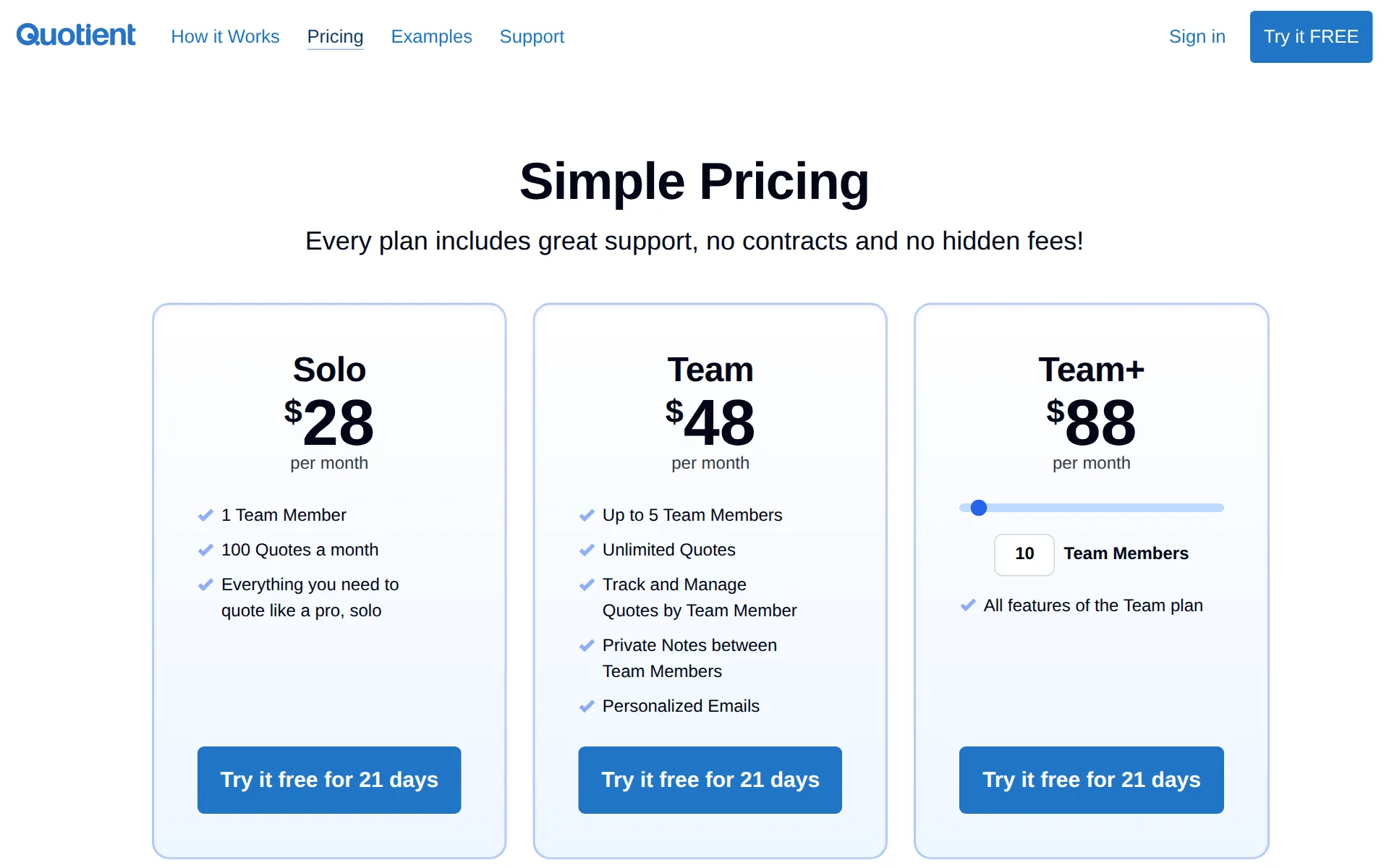
Pricing page, captured
quotientapp.com/pricing, checked
All plans and limits
| Plan | Price | Quotes | Team Members |
|---|---|---|---|
| Solo | $28 a month | 100 a month | 1 Team Member |
| Team | $48 a month | Unlimited | Up to 5 |
Read from quotientapp.com/pricing.
What we checked on Quotient
Quote only
The vendor publishes self-serve monthly prices for Solo, Team, and the Team+ member-rate structure.
Every plan includes great support, no contracts and no hidden fees!
quotientapp.com/pricingChecked
What the price is based on
Pricing uses team-member allowances: one member on Solo, five on Team, then eight dollars per additional member.
Each additional Team Member is $8 USD per month.
quotientapp.com/pricingChecked
Adding a user
Solo includes one team member, Team includes up to five, and further members cost eight dollars monthly.
The Team plan includes up to 5 Team Members. For 6 or more Team Members, check out the Team+ plan above!
quotientapp.com/pricingChecked
Card processing rate
Customers can pay a deposit from connected accounting invoices, but Quotient publishes neither a rate nor processor requirement.
If your Xero or QuickBooks setup includes online payment options, the customer can pay the deposit directly from the invoice.
Texts to customers
The dashboard identifies quotes needing follow-up and lets the author send a prepared follow-up email.
Your Quotient Dashboard will automatically alert you to any Quotes that need following up
Works without signal
The mobile progressive web app requires an internet connection, so offline field use is not supported.
Note: Quotient requires an internet connection.
Quotes and estimates
Customers can accept online quotes with a single click, making the accepted agreement legally binding.
A simple click on the “Accept Quote” button turns the agreement into a legally binding deal.
quotientapp.com/tourChecked
Price book and options
Saved price items form a reusable quote library, including optional and multiple-choice customer options.
You can nominate Price Items to be Optional, part of a Multiple Choice group
Invoices
Accepted quotes can create invoices automatically or on demand in QuickBooks Online or Xero.
You can generate invoices from Quotient using: Xero, QuickBooks Online, Zapier, Webhooks
Card and bank payments
Connected Xero or QuickBooks invoices can accept deposits online when that accounting setup supplies payment options.
the customer can pay the deposit directly from the invoice.
Online booking
An embedded lead form collects customer requests for conversion to quotes, but does not document appointment-slot booking.
Your customers can send a new request online, directly to you – and into Quotient, ready to be converted into a Quote.
quotientapp.com/help/leadsChecked
Customer portal
Customers receive a personal quote link to view and accept quotes, not a documented full account portal.
It all starts when your customers receive an email with a personalized link to view their quote.
quotientapp.com/tourChecked
Review requests
Automated review emails can invite customers to post Google, Trustpilot, or Facebook reviews after completion.
Customers will only be given this option if their Review was rated 4 or 5 stars.
quotientapp.com/help/reviewsChecked
Leads and follow-ups
The lead list supports assigning, noting, converting, and following up customer opportunities.
Edit it: Give it a potential value, assign it to a Team Member, or add some notes.
quotientapp.com/help/leadsChecked
Marketing campaigns
Quotient can copy contacts to Mailchimp after quotes are sent, while campaign sending occurs in Mailchimp.
continue to copy Contacts to Mailchimp every time a Quote is sent
quotientapp.com/integrationsChecked
QuickBooks Online
Quotient connects to QuickBooks Online and Xero, creating invoices from accepted quotes.
once a Quote has been accepted, an invoice can be created automatically in QuickBooks.
Xero
Quotient connects to QuickBooks Online and Xero, creating invoices from accepted quotes.
On the page: QuickBooks Online help, introduction
Zapier and API
Developers can receive JSON event payloads through webhooks, while non-developers can use Zapier.
Quotient Webhooks allow you to receive a payload of data in JSON format whenever certain events happen
quotientapp.com/webhooksChecked
Free trial or free plan
A 21-day trial includes all paid-account features and requires no billing information to start.
The free trial has all the features of a paid account.
Sign up without a sales call
A buyer can create a new account from the free-trial flow without entering a credit card.
No credit card required.
quotientapp.com/pricingChecked
Contract and cancelling
Subscriptions bill monthly and can be cancelled in account settings without calling sales.
Billing cycles are set on a monthly basis.
quotientapp.com/termsChecked
Support
Quotient offers a support contact form and a help-article library, but does not state support hours or phone availability.
Explore specific Quotient features in our Help Articles, or send us a message…
quotientapp.com/supportChecked
Getting your data out
Administrators can export contacts, price items, text items, quotes, and quote line items.
Export: - Quotes - Quotes with Price Items
Quotient alternatives
All 5 alternatives2 more alternatives
All 5 publish a price.
- JoistFrom $10 a monthPhone and web app for one contractor to quote, bill and get paid on site, with homeowner financing on all plans.
- CleanGuruFrom $79 a monthJanitorial software built around bidding: workloaded cleaning times, price recommendations and ready-made proposals.


Sources and changes
Last changed
Sources on quotientapp.com18
- /pricing
- /
- /help/import-and-export-overview
- /help/install-quotient-web-app-on-your-iphone-or-ipad
- /help/invoicing-overview
- /help/release-notes
- /tour
- /help/deposits
- /help/leads
- /help/following-up-quotes
- /help/free-trial
- /help/price-items-an-overview
- /help/quickbooks-online-getting-connected
- /help/reviews
- /integrations
- /support
- /terms
- /webhooks
Similar to Quotient
- ArborgoldGreen-industry job software with plant and tree records, chemical logs and crew time in one account.
- BriostackRecurring pest and turf treatment software sold by concurrent login, so you pay for staff signed in simultaneously.
- BuildOpsField service and project software for commercial mechanical, electrical and plumbing contractors.
- CLIPLawn care, landscaping and snow removal software for scheduling, routing, billing and crew tracking.


From our research
- Landscape design and build software: 13 tools ranked by costWhat 13 landscaping business tools cost a month for a five-person crew, from Lawn Buddy at $39 to Service Autopilot at $528, with a verdict on each.
- How to choose field service management softwarePick on what the crew pays a month, how easily you can cancel and take your data, QuickBooks sync and whether it is built for your trade.
- Jobber vs Housecall Pro: what a 5- and 10-person crew paysJobber costs $199 a month for 5 users and $299 for 10. Housecall Pro is $299 and $799 on Essentials. Crew prices and the features that differ, Nov 2026.
Is Quotient yours?
It's free and marks the page as verified. You confirm it with an email at quotientapp.com. Claim this listing
Report an error if a fact is wrong.