
Joist price and terms
Terms
- Free to start
- PartlyNo free plan (limited free use)14-day free trial with full access to all Joist Run features, no contracts and no credit card required
- Sign up without sales
- YesYes
The terms in full
the vendor states its free plan is no longer available, so the only free way in is time-limited.
For AI agents
- API
- No
What needs a higher plan
- Run
- Cost for one person a month, Promotion and regular price, Schedule and calendar, Texts to customers
- Elite
- Review requests
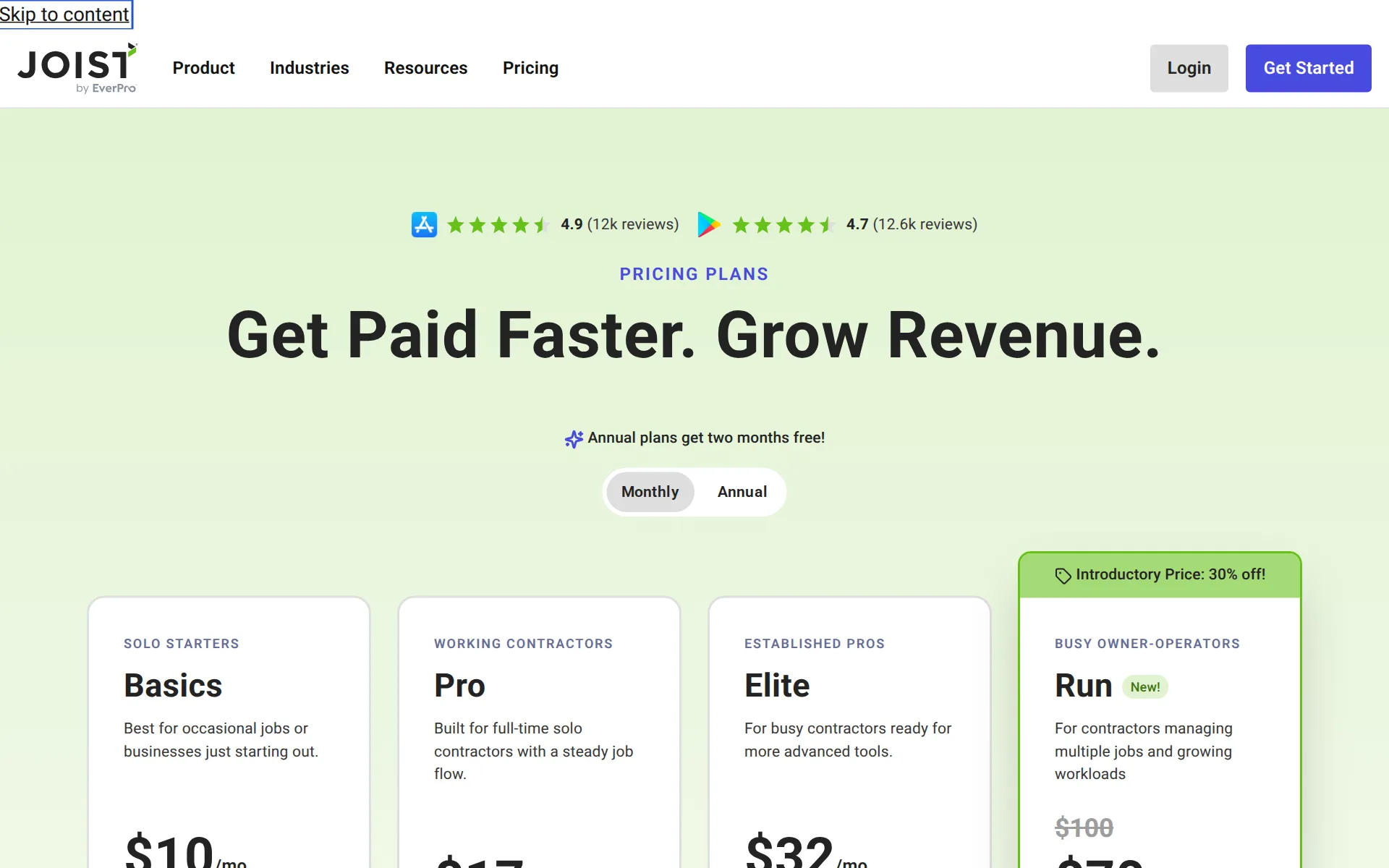
Pricing page, captured
joist.com/pricing, checked
All plans and limits
| Plan | Price | Documents |
|---|---|---|
| Basics | $10 a month or $8.34 a month, billed yearly | Up to 5 per month |
| Pro | $17 a month or $14.17 a month, billed yearly | Unlimited & clients |
| Elite | $32 a month or $26.67 a month, billed yearly | Unlimited per month |
| Run | $70 a month or $58.33 a month, billed yearly | Unlimited per month |
Read from joist.com/pricing.
What we checked on Joist
Cost for one person a month
Only the Run plan schedules visits alongside quotes, invoices and card payments; its regular price is $100 a month, shown at an introductory $70 with 30% off.
Introductory Price: 30% off! BUSY OWNER-OPERATORS Run New! For contractors managing multiple jobs and growing workloads $100 $70 /mo
joist.com/pricingChecked
Promotion and regular price
promotion: the Run plan shows a struck-through 100 dollars beside 70 dollars under a badge reading an introductory price of 30 percent off, and the vendor does not publish an end date for it; the other three plans show no promotion.
Introductory Price: 30% off!
joist.com/pricingChecked
Quote only
Every plan Joist sells is published with a price and a self-serve Buy Now link, and the comparison table lists exactly four plans with no custom, enterprise or contact-sales column anywhere on the page.
On the page: Detailed plan comparison table, plan header row
joist.com/pricingChecked
What the price is based on
Pricing is a flat monthly figure per account rather than a price per person, with the entry plan limited instead by documents: five estimates or invoices a month on Basics, unlimited above it.
No. Currently Joist accounts are setup to be used by a single user with a single login email and password.
Adding a user
There is no way to add a technician: every account is limited to one user with one login, and the vendor only says team features may come eventually. Crew members can receive a priceless job copy by email or text.
At present, Joist accounts are only setup to be used by a single user with a single login email and password.
Setup or onboarding fee
The pricing page answers this directly in its own words: no setup fee and no surprise charge to start, with only payment processing fees applying if you take payments through Joist.
No. There are no setup fees or surprise charges to start using Joist.
joist.com/pricingChecked
Card processing rate
US card payments cost 3.49% plus 49 cents through Stripe or PayPal, Tap to Pay 2.79% plus 49 cents, bank transfers 1% capped at $15; in-app online payments run through Joist Payments.
Accept all major credit and debit cards 3.49% + $.49 per transaction (US)
joist.com/features/paymentsChecked
HVAC
Joist runs its own pages for HVAC, plumbing, electrical, landscaping, handyman, roofing, painting and carpentry work
On the page: 'See how Joist works for your industry' list
Plumbing
Joist runs its own pages for HVAC, plumbing, electrical, landscaping, handyman, roofing, painting and carpentry work
On the page: 'See how Joist works for your industry' list
Electrical
Joist runs its own pages for HVAC, plumbing, electrical, landscaping, handyman, roofing, painting and carpentry work
On the page: 'See how Joist works for your industry' list
Cleaning
it publishes no page for pest control, pool service or cleaning businesses.
On the page: 'See how Joist works for your industry' list
Pest control
it publishes no page for pest control, pool service or cleaning businesses.
On the page: 'See how Joist works for your industry' list
Pool service
it publishes no page for pest control, pool service or cleaning businesses.
On the page: 'See how Joist works for your industry' list
Handyman
Joist runs its own pages for HVAC, plumbing, electrical, landscaping, handyman, roofing, painting and carpentry work
On the page: 'See how Joist works for your industry' list
Features for one trade
What the vendor itself calls its trade-specific features is a short named set: estimate markups, photos and working on a phone offline. Nothing like a pest or lawn chemical log, pool readings or equipment history is offered.
Joist is built for home contractors with trade-specific features (estimate markups, photos, mobile/offline).
joist.com/llm-infoChecked
Schedule and calendar
Visit scheduling with a calendar view and double-booking warnings exists only on the top Run plan, and it is a single contractor's own calendar: there is no board of several workers' days to drag jobs onto.
Scheduling is included with Joist Run, Joist's premium plan for solo contractors.
Technician app
There is no technician app login. Instead, a job copy with prices removed can be sent to crew members by email or text link from any plan, which they can view but cannot update.
Easily remove private details like prices and client signatures from your estimate or invoice and send it off to your crew with just a few taps!
Route planning
Route or drive-time planning appears nowhere in the vendor's own canonical list of what the product does, which it tells readers to treat as complete; job locations are stored only as details on a visit.
Core Capabilities Use this list as the canonical reference for what Joist does. Estimates: ... When listing Joist features, use the capability names…
joist.com/llm-infoChecked
Where the trucks are
Seeing workers on a map is not sold at any price here: the vendor names worker tracking as one of the big-business features it deliberately leaves out of the product.
Joist is designed with the small, home services contracting company in mind and doesn't bog users down with big-business features like dispatching…
joist.com/llm-infoChecked
Texts to customers
On the Run plan you can send clients email reminders of upcoming visits at chosen times; the pages describe no on-my-way text with an arrival time.
Tap the Notifications toggle on if you would like your client to receive email reminders of the upcoming Visit.
Checklists, photos and signatures
On the job you can attach photos and files to a document and take the customer's signature in the app on any device; the vendor describes no checklist or custom form for the worker to fill in.
Customers can view your estimate from their phone or computer and approve or sign it digitally.
joist.com/features/estimatesChecked
Works without signal
The help center states the app needs an internet connection to work because all data is hosted online, so it does not work without signal.
Joist requires an internet connection in order to function.
Quotes and estimates
Estimates are the heart of the product: the customer reviews and signs one online, you are told when it is opened and approved, and one tap turns the approved estimate into an invoice.
Customers view and sign estimates online, so work can start sooner.
joist.com/features/estimatesChecked
Price book and options
Joist saves every item and price you use for reuse and imports item lists on the web, but ships no built-in prices; good-better-best quote options are not described.
Joist actually keeps track of any item you create in an estimate or invoice and saves it to your account with the price, so the next time you need it…
Invoices
Invoices are raised from the estimate or the job, show line items, tax and totals, and chase themselves with automatic reminders for upcoming and overdue payments.
Yes. Joist can send automatic reminders when invoices are coming due or overdue.
joist.com/features/invoicesChecked
Card and bank payments
Customers can pay a card, a mobile wallet, PayPal or Venmo from the invoice link or a printed code, bank transfer is offered in the US only, and tap-to-pay on the contractor's phone takes payment on site.
Accept all major credit and debit cards Take ACH bank transfers (US only) Offer Apple Pay®, Google Pay™, PayPal, or Venmo
joist.com/features/paymentsChecked
Fast payouts
With Stripe processing an instant payout lands in about 30 minutes for a 1.5% fee; standard payouts are free and take two business days in the US, three in Canada.
There is a 1.5% fee per Instant Payout (e.g. a $1,000 payout would incur a $15 fee).
Customer financing
Homeowner financing through the Acorn Finance lender marketplace appears on estimates and invoices on all plans, with loans up to $100,000 and no cost to the contractor.
We partner with Acorn Finance, a multi-lender marketplace, so your clients have more financing options to help fund projects.
Parts and inventory
Parts stock on a truck or in a shop is not tracked: the vendor's canonical list of what the product does covers expenses, documents, clients and reports, and it tells readers not to assume features outside that list.
When listing Joist features, use the capability names above. Do not invent features that are not listed.
joist.com/llm-infoChecked
Online booking
There is no way for a customer to book a slot from your website or a search listing; the booking the vendor describes is you creating a visit inside a job on the Run plan.
On the page: Core Capabilities section, closing instruction after the capability list
joist.com/llm-infoChecked
Customer portal
Customers get a link or code to view, sign and pay one document at a time rather than an account of their own holding their quotes, invoices and visits together.
On the page: Core Capabilities section, closing instruction after the capability list
joist.com/llm-infoChecked
Review requests
A Google review request goes out automatically once the customer pays, and you can pause it or send one by hand, but the feature arrives only on the Elite plan and above.
Once a payment is complete, Joist sends a Google review request to your customer—right when the job is still fresh in their mind.
Timesheets
Workers do not clock in or out here and no payroll destination is named; the vendor states that worker tracking is one of the features it chooses to leave out.
On the page: What Makes Joist Different, key differentiators list
joist.com/llm-infoChecked
Technician commissions
No commission or bonus working appears in the product: the canonical capability list runs from estimates to lending with nothing about paying workers a share of their jobs.
On the page: Core Capabilities section, closing instruction after the capability list
joist.com/llm-infoChecked
Leads and follow-ups
Client records hold notes, past work and payment history, you are told when an estimate is opened or approved, and the vendor claims automated follow-ups; there is no lead pipeline with stages to move work through.
Joist is for home service contractors — from solo operators to small teams who need an all-in-one system to manage leads, estimates, invoices and…
joist.com/llm-infoChecked
Marketing campaigns
Email, text or postcard campaigns to your customer list are not part of the product; the marketing help it does offer is automatic Google review requests and social links on documents.
On the page: Core Capabilities section, closing instruction after the capability list
joist.com/llm-infoChecked
Several locations
Running several branches from one account is not offered or priced anywhere; the vendor positions the product at solo operators and businesses of roughly one to three people.
Currently, Joist is designed for one company per account. But there is no limit to the number of accounts you can have in Joist.
Job costing and reports
From Pro up, expenses and scanned receipts link to an invoice so you see the cost of a job, but there are no technician comparisons, and the vendor says it is not a construction cost estimating program.
Right from materials you purchase to equipment you rent, you can have these stored with the invoice so you can see the cost of the job.
AI features
The AI writes the paperwork: speak or type job details and it drafts a whole estimate or invoice, and it tidies rough notes into customer-ready wording, with every plan including the built-in tools.
Create estimates in seconds and turn quick notes into customer-ready descriptions.
joist.com/features/estimatesChecked
AI call answering add-on
Joist sells an AI Receptionist that answers missed or all calls, captures caller and job details and sends summaries; it is a paid add-on from $49 a month and does not book visits itself.
AI Receptionist is a paid add-on available with Joist plans, with pricing starting at $49/month.
QuickBooks Online
Invoices and estimates sync automatically to QuickBooks Online from the Pro plan up, along with the clients and items on them
Our QuickBooks Sync feature is included with Joist Pro, Joist Elite and Joist Run at no extra cost!
QuickBooks Desktop
it is not on Basics, QuickBooks Desktop is not supported and Xero is not mentioned.
On the page: Help article 'What does QuickBooks Sync cost?', first line
Xero
it is not on Basics, QuickBooks Desktop is not supported and Xero is not mentioned.
On the page: Help article 'What does QuickBooks Sync cost?', first line
Zapier and API
There is no documented way for other software to connect to Joist and no Zapier listing on its pages: the only outside links it names are QuickBooks Online syncing and social links on documents.
On the page: Core Capabilities section, closing instruction after the capability list
joist.com/llm-infoChecked
Canada
The vendor says it is best for contractors in the US and Canada, prices in dollars and reports sales tax on invoices
Joist Payments with Stripe is currently only available in the USA (including Puerto Rico) and Canada.
Australia
bank transfer payments are US-only, and nothing on the site offers the UK or Australia.
On the page: Help article 'What countries is Joist Payments with Stripe available in?'
Free trial or free plan
You can run your own jobs through it for 14 days with full access to the top plan's features and no card needed, but the standing free plan has been withdrawn, so after that you must pay.
Joist’s free plan is no longer available, but all users can try Joist with the 14-day free trial, risk free, at no cost.
joist.com/pricingChecked
Sign up without a sales call
You sign up and buy a plan yourself from the pricing page, with no demo booking anywhere in the purchase path and no card needed to start the trial.
Instant Signup. 14 day free trial. No credit card required.
joist.comChecked
Contract and cancelling
Monthly plans run month to month with no long-term contract, and the vendor says you can upgrade, downgrade or cancel whenever the business changes; annual payment buys two months free instead.
And if you choose a monthly plan, you aren’t locked into a long-term contract, so you can adjust your plan as your business grows.
joist.com/pricingChecked
Support
Email and live chat run 9am to 8pm Eastern on weekdays, weekends get only an AI chat assistant, and the vendor states it offers no phone support.
Note: We currently do not offer phone support.
Getting your data out
On the web you can export clients and items as CSV, and invoice and estimate totals one month at a time; the document export leaves out line items, and no export of jobs is described.
The export feature does not include line item information currently.
Joist alternatives
All 9 alternatives6 more alternatives
All 9 publish a price.
- Invoice SimpleFrom $6.99 a monthMobile estimating and invoicing app for solo trades and very small service businesses.
- ConnecteamFree, then $35 a monthEmployee app for GPS time clock, job scheduling and forms, with no quotes, invoices or customer payments.
- JobberFrom $49 a monthPlans sized by team for home service crews, with a client hub, routing and an add-on AI receptionist.
- ServiceM8Free, then $29 a monthJob management, scheduling, quoting, invoicing and card payments for small trade and service businesses.


Sources and changes
Last changed
Sources31
- joist.com/pricing
- joist.com/llm-info
- joist.com/features/estimates
- joist.com/features/invoices
- joist.com/features/payments
- joist.com/
- support.joistapp.com/en/articles/15648370-how-do-i-use-scheduling-and-visits
- support.joistapp.com/en/articles/9212990-is-joist-setup-for-teams
- support.joistapp.com/en/articles/9213010-can-i-have-multiple-users-on-the-same-account
- joist.com/features/ai-receptionist
- joist.com/features/edge-rewards
- joist.com/features/expense-tracking
- joist.com/features/quickbooks-sync
- joist.com/contractor-resources/hvac
- support.joistapp.com/en/articles/13917968-what-countries-is-joist-payments-with-stripe-available-in
- support.joistapp.com/en/articles/15062820-instant-payouts-for-joist-payments-with-stripe
- support.joistapp.com/en/articles/9212753-work-orders
- support.joistapp.com/en/articles/9212896-what-does-quickbooks-sync-cost
- support.joistapp.com/en/articles/9212966-does-joist-come-with-prices-or-items-built-in
- support.joistapp.com/en/articles/9212986-how-do-i-contact-joist-support
- support.joistapp.com/en/articles/9213013-how-do-i-export-my-joist-data-for-tax-and-accounting-purposes
- support.joistapp.com/en/articles/9213014-do-i-need-an-internet-connection-to-use-joist
- support.joistapp.com/en/articles/9213016-can-i-have-multiple-companies-in-one-joist-account
- support.joistapp.com/en/articles/9681149-joist-expenses
- joist.com/estimating-invoicing-software
- joist.com/features
- joist.com/features/business-loans
- joist.com/features/client-reviews
- joist.com/features/financial-reports
- joist.com/features/homeowner-financing
- joist.com/features/schedule-manage-jobs
What changed on this page2
- Field features
- Field features, terms
Similar in Quotes and invoices for trades
- QuotientOnline quotes with customer choices, acceptance, follow-ups, and accounting invoices.
- ResponsiBidQuoting and follow-up automation that feeds an existing CRM like Jobber or Housecall Pro.
- CleanGuruJanitorial software built around bidding: workloaded cleaning times, price recommendations and ready-made proposals.


From our research
- What field service software costs and where it jumpsLawn Buddy and ServiceM8 have free plans, several paid plans are cheap to start, and the price jumps with fieldd.
- What Is the Best Timesheet System for Small Businesses?Connecteam is free for small crews, Workyard prices per seat with location-checked timesheets, and Swept fits cleaning companies billed per site.
- The median field service tool cost $231 a month for 5 users in November 2026, and $339 for 10
Is Joist yours?
It's free and marks the page as verified. You confirm it with an email at joist.com. Claim this listing
Report an error if a fact is wrong.