
Connecteam price and terms
Terms
- Free plan
- YesYesSmall Business Plan: free for life for up to 10 users (active and archived), with all hubs and most features
- Sign up without sales
- YesYes
The terms in full
A free Limited plan is also available for up to 30 users with fewer features. Every account starts with a 14-day Expert trial, no credit card needed.
For AI agents
- API
- PartlyOperations Expert
What needs a higher plan
- Enterprise
- Quote only
- Operations Hub Advanced
- Maintenance plans and recurring jobs
- Operations Advanced
- Several locations
- Operations Expert
- Zapier and API
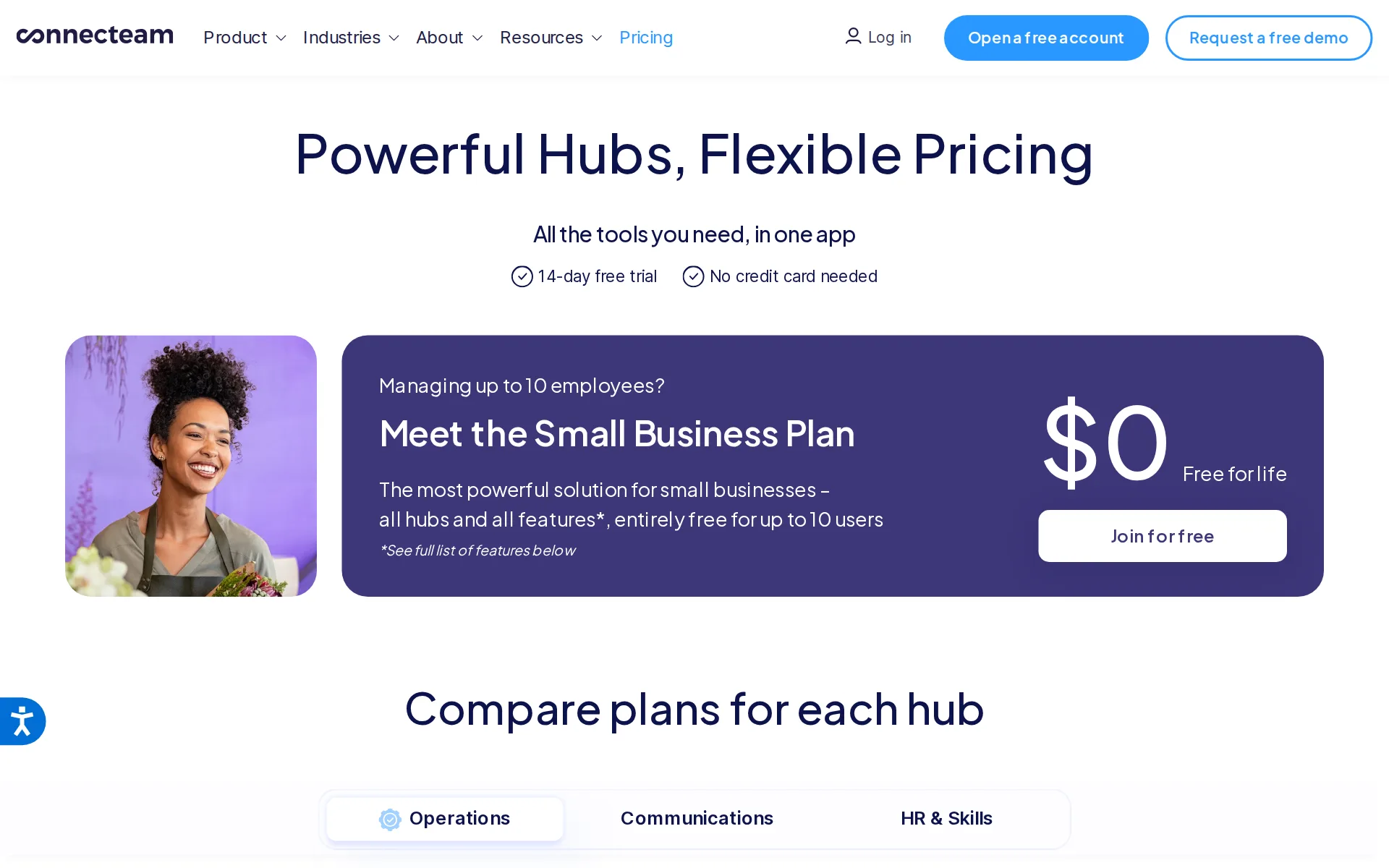
Pricing page, captured
connecteam.com/pricing, checked
All plans and limits
| Plan | Price | Main limits |
|---|---|---|
| Limited | $0 a month | up to 30 users |
| Small Business | $0 a month | up to 10 users |
| Communications Basic | $35 a month or $29 a month, billed yearly | Users included: the first 30 users |
| HR & Skills Basic | $35 a month or $29 a month, billed yearly | Users included: the first 30 users; Custom recognition badges: 5 badges |
| Operations Basic | $35 a month or $29 a month, billed yearly | Users included: the first 30 users |
| Communications Advanced | $59 a month or $49 a month, billed yearly | Users included: the first 30 users |
| HR & Skills Advanced | $59 a month or $49 a month, billed yearly | Users included: the first 30 users; E-sign documents: Up to 2 documents; Time off policies with balance: 9 policies |
| Operations Advanced | $59 a month or $49 a month, billed yearly | Users included: the first 30 users; Geofence sites: Up to 10 sites |
| Communications Expert | $119 a month or $99 a month, billed yearly | Users included: the first 30 users |
| HR & Skills Expert | $119 a month or $99 a month, billed yearly | Users included: the first 30 users; E-sign documents: Up to 10 documents |
| Operations Expert | $119 a month or $99 a month, billed yearly | Users included: the first 30 users; Geofence sites: Unlimited sites; up to 12 schedules |
| Communications Enterprise | Price on request | None stated |
| HR & Skills Enterprise | Price on request | E-sign documents: Up to 30 documents |
| Operations Enterprise | Price on request | None stated |
Read from connecteam.com/pricing.
What we checked on Connecteam
Promotion and regular price
yearly shown monthly. The pricing page opens on yearly billing, so Operations Basic first shows $29/mo; with the Monthly toggle clicked it reads $35/mo, the regular month-to-month price.
Yearly save 18%
connecteam.com/pricingChecked
Quote only
Enterprise is described as a business-specific plan and has no public numeric rate on the plan card.
A pricing plan customized for your business
connecteam.com/pricingChecked
What the price is based on
Each paid plan has a fixed monthly price for up to 30 users, then a price for each extra user. Each hub (Operations, Communications, HR) is billed separately.
Our prices are fixed for the first 30 users, and from the 31st user and above we have a price per user, per month, for each plan.
connecteam.com/pricingChecked
Adding a user
Users 1 to 30 are included in the plan price. Each user after that costs $1.0 to $5.0 a month on monthly billing, depending on the Operations plan. The free Small Business Plan covers up to 10 users.
Basic / Monthly: $1.0 per month for each additional user
connecteam.com/pricingChecked
Setup or onboarding fee
The pricing page lists no required setup fee. Optional paid setup by a certified pro costs $40 for each 50-minute session and can include data migration.
Book a pro meeting - $40 per 50min session
HVAC
Connecteam publishes dedicated industry pages for HVAC, plumbing, electricians, lawn care, cleaning, pest control, and handyman businesses.
Manage your HVAC business efficiently and confidently, knowing your techs always deliver top-quality and timely service with one powerful app.
Plumbing
Connecteam publishes dedicated industry pages for HVAC, plumbing, electricians, lawn care, cleaning, pest control, and handyman businesses.
On the page: Hero paragraph under 'Simplify HVAC team management'
Lawn care and landscaping
Connecteam publishes dedicated industry pages for HVAC, plumbing, electricians, lawn care, cleaning, pest control, and handyman businesses.
On the page: Hero paragraph under 'Simplify HVAC team management'
Cleaning
Connecteam publishes dedicated industry pages for HVAC, plumbing, electricians, lawn care, cleaning, pest control, and handyman businesses.
On the page: Hero paragraph under 'Simplify HVAC team management'
Pest control
Connecteam publishes dedicated industry pages for HVAC, plumbing, electricians, lawn care, cleaning, pest control, and handyman businesses.
On the page: Hero paragraph under 'Simplify HVAC team management'
Handyman
Connecteam publishes dedicated industry pages for HVAC, plumbing, electricians, lawn care, cleaning, pest control, and handyman businesses.
On the page: Hero paragraph under 'Simplify HVAC team management'
Features for one trade
Its field-services materials document job-linked time, forms, photos, signatures, locations, and service instructions for field teams.
Capture proof of service with digital forms, photos, and signatures
Schedule and calendar
Field-service managers can automatically assign jobs using availability, skills, certifications, or location, and add job details.
Have a clear calendar view of schedules and when everyone’s working
Technician app
The field-services product keeps job communication, service details, and resources together for field teams using the app.
Add details, addresses, and instructions to each scheduled job
Route planning
Scheduling accounts for drive time between jobs, but the reviewed page does not claim stop-order optimization.
Account for drive time between jobs to keep the day running smoothly
Where the trucks are
The office can see where each worker is in real time while they are on the clock. GPS clock-in is included from the Basic plan, with no extra fee shown, and geofence sites start at Advanced.
View each tech’s real-time location and assign sudden jobs on the go
Maintenance plans and recurring jobs
Repeating shifts and templates start on the Advanced plan, so recurring visits can be scheduled; selling maintenance plans to customers is not described anywhere.
Schedule repeating shifts and templates
connecteam.com/pricingChecked
Checklists, photos and signatures
Field teams can capture service proof through digital forms, photos, and signatures during field jobs.
On the page: 'Complete job oversight' section
Works without signal
The help center states the mobile app, kiosk and desktop all need an internet connection; offline time clock and form submission are only feature requests.
At the moment it's currently not possible to use Connecteam offline, whether from the mobile app, Kiosk application, or desktop.
Quotes and estimates
Connecteam states that it lacks built-in features for creating quotes or estimates, requiring separate software.
Doesn’t support quotes and estimates: While Connecteam excels at operations, communication, and time tracking, it lacks built-in features for…
Invoices
Connecteam does not create customer invoices. Its own invoicing guide says to export job hours to an Excel spreadsheet and make the invoice from that file, outside the product.
Export this information by clicking on Export. This will download an Excel spreadsheet which you can use to generate the invoicing and share with…
Online booking
Connecteam has no booking page of its own on the pages read. Client bookings come in only through its Wix Bookings integration, which syncs them with team schedules.
Have your client bookings and team schedules synced via Wix Bookings
connecteam.com/integrationsChecked
Timesheets
Employees can clock in from a phone, with GPS and timesheets that can be exported or synced to payroll.
Each one of these integrations allows you to export your employees' hours and conduct your payroll as quickly and efficiently as possible!
Several locations
Separate time clocks and schedules for each branch start on the Operations Advanced plan. Expert allows up to 12 schedules, Enterprise is unlimited, and Basic has a single time clock and schedule.
On the Operations Hub > Advanced plan and above you can add more than a single time clock / schedule to your account.
connecteam.com/pricingChecked
AI features
The scheduling page describes AI scheduling, while field-service materials also describe AI translation and an AI chat agent.
Introducing Connecteam AI: Auto Scheduling, AI Agent, and more.
QuickBooks Online
QuickBooks Online and Xero connect for payroll, exporting employee hours
In addition, we also have export templates available for: Quickbooks Desktop
QuickBooks Desktop
QuickBooks Desktop gets an IIF timesheet export template.
On the page: Article body, payroll integrations and export templates lists
Xero
QuickBooks Online and Xero connect for payroll, exporting employee hours
On the page: Article body, payroll integrations and export templates lists
Zapier and API
Developer access and webhooks are included only on Expert and Enterprise. Connecteam's setup page says its Zapier setup service is for Advanced and Expert plans only.
Everything in Operations Advanced, plus:
connecteam.com/pricingChecked
Canada
Prices are in US dollars only, and payroll integrations cover the US, Canada (ADP), the UK, Australia and New Zealand (Xero).
All prices on our website and product are in USD only at the moment.
connecteam.com/pricingChecked
Australia
Prices are in US dollars only, and payroll integrations cover the US, Canada (ADP), the UK, Australia and New Zealand (Xero).
On the page: FAQ, 'In what currency is your pricing?'
connecteam.com/pricingChecked
Free trial or free plan
Teams of up to 10 users get the Small Business Plan free for life with Expert-level features, and everyone else gets a 14-day trial without a card.
Yes! The Small Business Plan is completely FREE for small businesses with up to 10 employees!
Sign up without a sales call
The pricing page offers a free-account path and states that no credit card is needed for the trial.
No credit card needed, no strings attached.
connecteam.com/pricingChecked
Help getting set up
During the trial, the customer success team helps you decide whether Connecteam fits. Hands-on setup and data migration by a certified pro is a paid extra at $40 per 50-minute session.
Transfer your information from previous tools into Connecteam
Contract and cancelling
Monthly plans cancel at any time without refund of prepaid amounts; annual plans get a prorated refund only in the first 30 days.
We offer a monthly subscription that can be canceled at any time (no refunds will be granted for any pre-paid amounts)
connecteam.com/pricingChecked
Support
Support runs as 24-hour live chat plus email; no phone line is listed on the support contact page.
24 hours live chat support, learn more
Connecteam alternatives
All 9 alternatives6 more alternatives
8 of the 9 publish a price.
- WorkizFrom $275 a month billed annuallyDispatch and billing app with its own phone system and a paid AI that books callers in English, Spanish or French.
- WorkyardFrom $6 a seat a month billed annuallyGPS-verified crew time tracking, scheduling and labor job costing built for US contractors.
- Lawn BuddyFree, then $12 a monthLawn care and landscaping software: scheduling, routing, invoicing and a separate crew app.
- KickservFrom $75 a monthJob and billing app for small home trades that keeps customers, invoices and payments matched in QuickBooks both ways.


Sources and changes
Last changed
Sources18
- connecteam.com/pricing
- connecteam.com/industries/field-services
- connecteam.com/employee-time-clock-app
- connecteam.com/connecteam-experts
- connecteam.com/employee-scheduling-app
- help.connecteam.com/en/articles/9178893-what-payroll-integrations-does-connecteam-offer
- connecteam.com/industries/hvac-app
- connecteam.com/small-business-plan
- connecteam.com/ai-capabilities
- connecteam.com/ai-terms
- connecteam.com/connecteam-vs-jobber
- connecteam.com/contact/support
- help.connecteam.com/en/articles/8999016-invoicing-with-connecteam
- help.connecteam.com/en/articles/9414361-can-the-connecteam-app-be-used-offline
- connecteam.com/industries
- connecteam.com/integrations
- connecteam.com/integrations/quickbooks-integration
- connecteam.com/integrations/zapier-integration
What changed on this page1
- Field features
Similar to Connecteam
- OptimoRouteRoute and schedule optimization that plans every technician's day at once and sends it to a driver app.
- SweptJanitorial software priced per cleaning location with unlimited users, built around proof of work at each site.
- ArborgoldGreen-industry job software with plant and tree records, chemical logs and crew time in one account.
- BriostackRecurring pest and turf treatment software sold by concurrent login, so you pay for staff signed in simultaneously.


From our research
- Best Free Timesheet Software for Small BusinessesConnecteam is the free pick, with its Small Business Plan free for life for small teams; Workyard offers a trial and Swept has no free plan.
- Landscape design and build software: 13 tools ranked by costWhat 13 landscaping business tools cost a month for a five-person crew, from Lawn Buddy at $39 to Service Autopilot at $528, with a verdict on each.
- How to choose field service management softwarePick on what the crew pays a month, how easily you can cancel and take your data, QuickBooks sync and whether it is built for your trade.
Is Connecteam yours?
It's free and marks the page as verified. You confirm it with an email at connecteam.com. Claim this listing
Report an error if a fact is wrong.